WikiMaps
WikiMaps lets you select locations from text on the web, see them on a map, and view Wikipedia summaries for each one.
O que é WikiMaps?
WikiMaps é uma extensão do Chrome desenvolvida por AaronPlave, e sua principal característica é "WikiMaps lets you select locations from text on the web, see them on a map, and view Wikipedia summaries for each one.".
Capturas de Tela da Extensão


Baixar o arquivo CRX da Extensão WikiMaps
Baixe arquivos de extensão WikiMaps no formato crx, instale manualmente as extensões do Chrome no navegador ou compartilhe os arquivos crx com amigos para instalar facilmente as extensões do Chrome.
Instruções de Uso da Extensão
                        WikiMaps works best with locations that can normally be found on Google Maps (and optionally on Wikipedia).

How to Use:

---Viewing the map---
• Click on the WikiMaps icon in the extensions icon toolbar in the upper right hand corner of the screen. Then click "Display Map"

---Adding a location to WikiMaps---
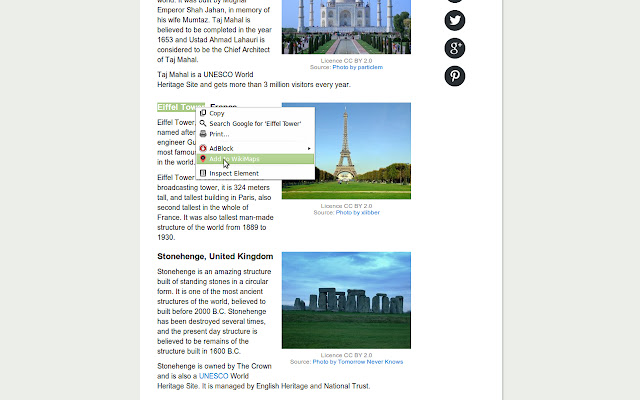
• Highlight some text you find on the web (for example "Empire State Building" or "Budapest, Hungary"). Then, right click on your highlighted text and select "Add to WikiMaps" in the menu that appears.
• Alternatively, in the map page (after you click "Display Map") you can enter locations to add in the "Add Locations" area.

---Removing locations---
• To remove a particular location, press the "x" button to the right of the location. To clear all locations, click the WikiMaps icon and then click "Clear List".

---Viewing Wikipedia Summary---
• To view the Wikipedia summary, click on an item in the map view and then click on "Summary" in the information window that appears above the map marker.


Other Features/Notes:
• Locations are saved locally and will be reloaded in the event you close your browser.
• You can sort the locations in the tables alphabetically by clicking on the "Location" label in the table.
• You can view a location in Google Maps by clicking "View in Google Maps" in the Wikipedia summary page of any location.
• If WikiMaps is unable to identify the location you attempted to add, the location will not be added.
• Not all locations will have complete or any Wikipedia data.

Future Improvements:
• Improve geocoding by pulling new coordinates from Wikipedia if data is found on Wikipedia for a location.
• Notifying the user whether an added location has been successfully added or was not successfully added.
• Better responsiveness to different window sizes.
• Ability to calculate distances between two locations on the map
• Ability to select multiple locations and export them to a Google map to get directions.
• Ability to export/share data with other users.
• Sets of locations
• Starred locations

See this on Github: https://github.com/AaronPlave/WikiMaps
Informações Básicas da Extensão
| Nome |  WikiMaps WikiMaps |
| ID | ibepgidgocafmabnegongehedkijfmac |
| URL Oficial | https://chrome.google.com/webstore/detail/wikimaps/ibepgidgocafmabnegongehedkijfmac |
| Descrição | WikiMaps lets you select locations from text on the web, see them on a map, and view Wikipedia summaries for each one. |
| Tamanho do Arquivo | 434 KB |
| Contagem de Instalações | 317 |
| Versão Atual | 1.2 |
| Última Atualização | 2014-07-02 |
| Data de Publicação | 2014-07-02 |
| Classificação | 4.00/5 Total de 1 Avaliações |
| Desenvolvedor | AaronPlave |
| Tipo de Pagamento | free |
| URL da Página de Ajuda | https://github.com/AaronPlave/WikiMaps |
| Idiomas Suportados | en |
| manifest.json | |
{
"update_url": "https:\/\/clients2.google.com\/service\/update2\/crx",
"name": "WikiMaps",
"version": "1.2",
"description": "WikiMaps lets you select locations from text on the web, see them on a map, and view Wikipedia summaries for each one.",
"icons": {
"16": "img\/16icon.png",
"48": "img\/48icon.png",
"128": "img\/128icon.png"
},
"commands": {
"add_selection": {
"suggested_key": {
"default": "Ctrl+Shift+Z",
"mac": "Command+Shift+Z"
},
"description": "Add selection to WikiMaps"
}
},
"background": {
"page": "html\/background.html"
},
"content_scripts": [
{
"matches": [
" | |