Supercharge
Supercharge your omnibox (addressbar) with many features.
O que é Supercharge?
Supercharge é uma extensão do Chrome desenvolvida por http://bjorn.wikkeling.com, e sua principal característica é "Supercharge your omnibox (addressbar) with many features.".
Capturas de Tela da Extensão

Baixar o arquivo CRX da Extensão Supercharge
Baixe arquivos de extensão Supercharge no formato crx, instale manualmente as extensões do Chrome no navegador ou compartilhe os arquivos crx com amigos para instalar facilmente as extensões do Chrome.
Instruções de Uso da Extensão
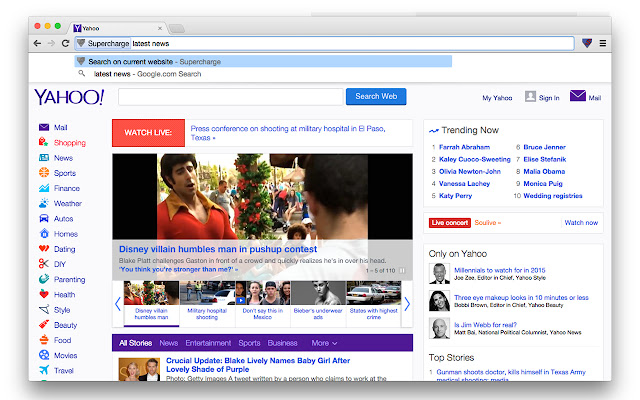
                        Supercharge your omnibox (addressbar) with this extension. By typing `s` (without the quotes) followed by a space, in the address bar you start the Supercharge extension. Then you can feed it several commands.

Tip: the keyboard shortcut CTRL+L (Windows/Linux) or CMD+L (OSX) highlights the URL.

These commands are currently available:

* Search current website
Type `s` (without the quotes) in the address bar followed by a space then type your search query and hit enter. You will now search within the website you are  currently visiting.

* Display IP adress
Type `s` (without the quotes) in the address bar followed by a space then type `ip` or just `i` (without the quotes) and hit enter. This will display your current IP address.

Features currently in development:
- search bookmarks
- search history
- switch to tab
- and many, many more...
Informações Básicas da Extensão
| Nome |  Supercharge Supercharge |
| ID | imjaflpheokfhbbmdohmmpabecjfigem |
| URL Oficial | https://chrome.google.com/webstore/detail/supercharge/imjaflpheokfhbbmdohmmpabecjfigem |
| Descrição | Supercharge your omnibox (addressbar) with many features. |
| Tamanho do Arquivo | 48.56 KB |
| Contagem de Instalações | 56 |
| Versão Atual | 0.0.3 |
| Última Atualização | 2015-01-07 |
| Data de Publicação | 2015-01-07 |
| Classificação | 5.00/5 Total de 1 Avaliações |
| Desenvolvedor | http://bjorn.wikkeling.com |
| [email protected] | |
| Tipo de Pagamento | free |
| Idiomas Suportados | en |
| manifest.json | |
{
    "update_url": "https:\/\/clients2.google.com\/service\/update2\/crx",
    "name": "__MSG_appName__",
    "short_name": "__MSG_appShortName__",
    "version": "0.0.3",
    "manifest_version": 2,
    "description": "__MSG_appDescription__",
    "icons": {
        "16": "images\/icon-16.png",
        "19": "images\/icon-19.png",
        "24": "images\/icon-24.png",
        "32": "images\/icon-32.png",
        "38": "images\/icon-38.png",
        "48": "images\/icon-48.png",
        "64": "images\/icon-64.png",
        "96": "images\/icon-96.png",
        "128": "images\/icon-128.png",
        "256": "images\/icon-256.png"
    },
    "default_locale": "en",
    "background": {
        "persistent": false,
        "scripts": [
            "scripts\/background.js"
        ]
    },
    "browser_action": {
        "default_icon": {
            "19": "images\/icon-19.png",
            "38": "images\/icon-38.png"
        },
        "default_title": "supercharge"
    },
    "omnibox": {
        "keyword": "s"
    },
    "permissions": [
        "tabs",
        "http:\/\/*\/*",
        "https:\/\/*\/*"
    ]
} | |