HTML Style Quick Viewer
HTML DOM element style quick viewer
O que é HTML Style Quick Viewer?
HTML Style Quick Viewer é uma extensão do Chrome desenvolvida por _(:з」∠)_, e sua principal característica é "HTML DOM element style quick viewer".
Capturas de Tela da Extensão
Baixar o arquivo CRX da Extensão HTML Style Quick Viewer
Baixe arquivos de extensão HTML Style Quick Viewer no formato crx, instale manualmente as extensões do Chrome no navegador ou compartilhe os arquivos crx com amigos para instalar facilmente as extensões do Chrome.
Instruções de Uso da Extensão
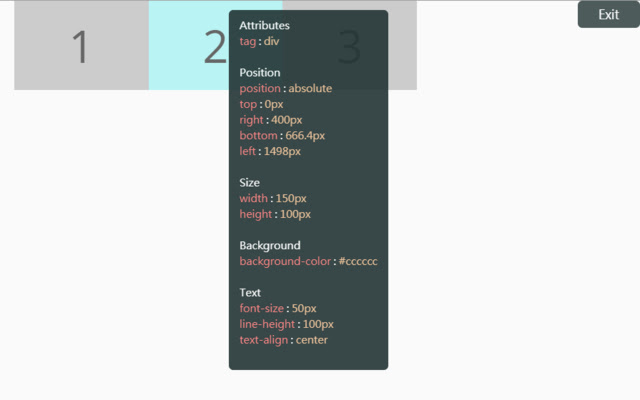
                        How about viewing the HTML DOM styles in a different way?
Just move your mouse and it shows the target's styles.

After installation, you may have to reload tabs to for the extension to take effect.

Instructions:
1. Click HTML Style Quick Viewer in the toolbar, then click 'run' button to start.
2. Move mouse to see the element's styles.
3. Mouse left click to close the popup panel.
4. Mouse middle click to pin the popup panel.
5. Click the 'Exit' button at the top-right or click 'Stop' button through the toolbar to stop.
Informações Básicas da Extensão
| Nome |  HTML Style Quick Viewer HTML Style Quick Viewer |
| ID | inafmkpmbkldliccdbeieeafnbkcmmap |
| URL Oficial | https://chrome.google.com/webstore/detail/html-style-quick-viewer/inafmkpmbkldliccdbeieeafnbkcmmap |
| Descrição | HTML DOM element style quick viewer |
| Tamanho do Arquivo | 15.88 KB |
| Contagem de Instalações | 271 |
| Versão Atual | 1.0.2 |
| Última Atualização | 2018-08-26 |
| Data de Publicação | 2018-08-26 |
| Classificação | 5.00/5 Total de 3 Avaliações |
| Desenvolvedor | _(:з」∠)_ |
| [email protected] | |
| Tipo de Pagamento | free |
| Idiomas Suportados | en |
| manifest.json | |
{
    "update_url": "https:\/\/clients2.google.com\/service\/update2\/crx",
    "name": "HTML Style Quick Viewer",
    "description": "HTML DOM element style quick viewer",
    "version": "1.0.2",
    "permissions": [
        "activeTab"
    ],
    "content_scripts": [
        {
            "matches": [
                "http:\/\/*\/*",
                "https:\/\/*\/*"
            ],
            "js": [
                "content\/content.js"
            ],
            "css": [
                "content\/content.css"
            ],
            "run_at": "document_start"
        }
    ],
    "browser_action": {
        "default_title": "HTML Style Quick Viewer\nRight click (Close)\nMiddle click (Pin)",
        "default_icon": {
            "16": "icons\/icon_16.png",
            "32": "icons\/icon_32.png",
            "48": "icons\/icon_48.png",
            "128": "icons\/icon_128.png"
        },
        "default_popup": "popup\/popup.html"
    },
    "manifest_version": 2
} | |