AltoConvertPDFtoWord: Free PDF to DOC Tool
Change PDF to Word with a perfect free tool and simple interface
O que é AltoConvertPDFtoWord: Free PDF to DOC Tool?
AltoConvertPDFtoWord: Free PDF to DOC Tool é uma extensão do Chrome desenvolvida por https://www.pdffiller.com, e sua principal característica é "Change PDF to Word with a perfect free tool and simple interface".
Capturas de Tela da Extensão


Baixar o arquivo CRX da Extensão AltoConvertPDFtoWord: Free PDF to DOC Tool
Baixe arquivos de extensão AltoConvertPDFtoWord: Free PDF to DOC Tool no formato crx, instale manualmente as extensões do Chrome no navegador ou compartilhe os arquivos crx com amigos para instalar facilmente as extensões do Chrome.
Instruções de Uso da Extensão
                        PDFs are good for sharing non-editable texts and protected files. If you want to use some information it contains or edit it, you’ll realize that it’s impossible without special software. A lite converter is a perfect solution to this problem. And there’s no need to install expensive and heavy programs. Our app works perfectly well and costs nothing. With the user-friendly PDF to Word converter, you get what you need without any extra effort.

It is one of the best converters due to its numerous features. This provides you with a perfect conversion process:

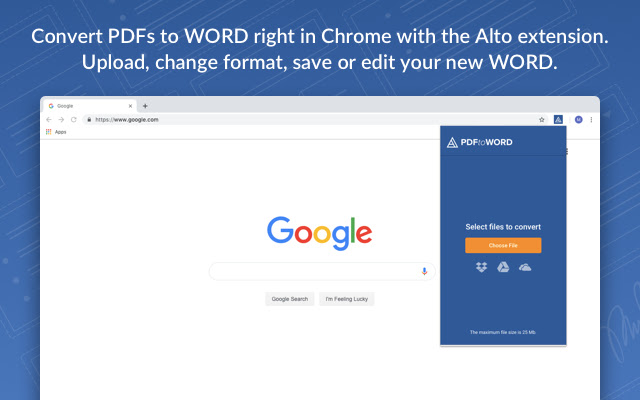
➤ Easy to install and work with. By adding this extension you get a powerful tool that is located in the cloud and has a smart and simple interface.
➤ Add files from wherever you want. It works perfectly well with both internal and cloud storages. Are you saving docs in the cloud? Then just select the store logo and import PDF from it.
➤ Complete protection on all conversion steps. We use the latest data encryption and decryption methods.
➤ No registration and sign up. We respect your privacy and have no access to your personal information nor to the content of your files. The system automatically removes files. There are no more processes after a page refreshes or a new operation starts.
➤ Fast file transformation and high-quality results. The converter recognizes every file format, font, spreadsheet, image, as well as their position on pages and formatting. After you save the final document version you will see that all needed elements and positionings remain absolutely the same, but you can easily rearrange or edit them.
➤ To transform a file you have into the one you need, you don’t need to spend a lot of time familiarizing with its capabilities. It is equipped with a step by step manual which saves you time.

The operation is completed in several simple steps. Open the app, import files and convert them wherever you are. Try this solution yourself and never have to deal with document format transformation problems anymore!
Informações Básicas da Extensão
| Nome |  AltoConvertPDFtoWord: Free PDF to DOC Tool AltoConvertPDFtoWord: Free PDF to DOC Tool |
| ID | ioaomfoojokoeimgoacpdjchmjhjlinp |
| URL Oficial | https://chrome.google.com/webstore/detail/altoconvertpdftoword-free/ioaomfoojokoeimgoacpdjchmjhjlinp |
| Descrição | Change PDF to Word with a perfect free tool and simple interface |
| Tamanho do Arquivo | 1.07 MB |
| Contagem de Instalações | 7,000 |
| Versão Atual | 1.0.12 |
| Última Atualização | 2021-04-08 |
| Data de Publicação | 2020-04-13 |
| Classificação | 4.79/5 Total de 14 Avaliações |
| Desenvolvedor | https://www.pdffiller.com |
| [email protected] | |
| Tipo de Pagamento | free |
| URL da Página de Política de Privacidade | https://altopdf.com/privacy_policy |
| Idiomas Suportados | en |
| manifest.json | |
{
    "name": "AltoConvertPDFtoWord: Free PDF to DOC Tool",
    "version": "1.0.12",
    "description": "Change PDF to Word with a perfect free tool and simple interface",
    "author": "PDFfiller",
    "manifest_version": 2,
    "icons": {
        "16": "icons\/16.png",
        "48": "icons\/48.png",
        "128": "icons\/128.png"
    },
    "permissions": [
        "*:\/\/*.amazonaws.com\/*",
        "*:\/\/*.pdffillers.com\/*",
        "*:\/\/*.pdffiller.com\/*",
        "https:\/\/www.googleapis.com\/",
        "background",
        "identity",
        "storage",
        "*:\/\/altoconvertpdftoword.com\/*"
    ],
    "browser_action": {
        "default_title": "AltoConvertPDFtoWord: Free PDF to DOC Tool",
        "default_popup": "pages\/popup.html"
    },
    "background": {
        "persistent": false,
        "scripts": [
            "js\/background.js"
        ]
    },
    "content_security_policy": "script-src 'self' 'unsafe-eval' https:\/\/content.googleapis.com https:\/\/ajax.googleapis.com https:\/\/www.googleapis.com https:\/\/apis.google.com; object-src 'self'",
    "update_url": "https:\/\/clients2.google.com\/service\/update2\/crx",
    "oauth2": {
        "client_id": "1060620009036-15tab91ko6uuuqrr8go14i944bd3oeg1.apps.googleusercontent.com",
        "scopes": [
            "https:\/\/www.googleapis.com\/auth\/drive"
        ]
    }
} | |