Fox Forum Helper
Add function (and Fun!) to the Fox News Forum.
O que é Fox Forum Helper?
Fox Forum Helper é uma extensão do Chrome desenvolvida por Hollies, e sua principal característica é "Add function (and Fun!) to the Fox News Forum.".
Capturas de Tela da Extensão



Baixar o arquivo CRX da Extensão Fox Forum Helper
Baixe arquivos de extensão Fox Forum Helper no formato crx, instale manualmente as extensões do Chrome no navegador ou compartilhe os arquivos crx com amigos para instalar facilmente as extensões do Chrome.
Instruções de Uso da Extensão
                        Add function and, and Fun!, to the  Fox News Forum. If you use the Fox News Forum a lot, you really want this extension!

The Fox Forum Helper extension adds the following functions to the Fox News Forum. Each function is selectable and you can use any or all of them:

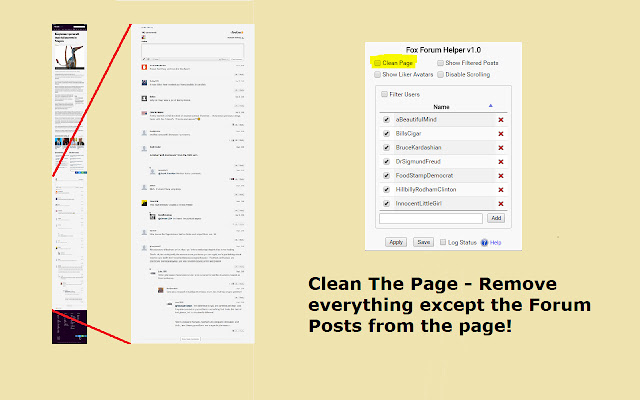
1) Clean The Page – removes all content except the forum from the page

2) Show Liker Avatars – see the avatars of those who "liked" posts. (This is built into livefye but disabled by Fox News.

3) Show Filtered Posts - see posts that have been filtered due to content (or deleted by the poster)

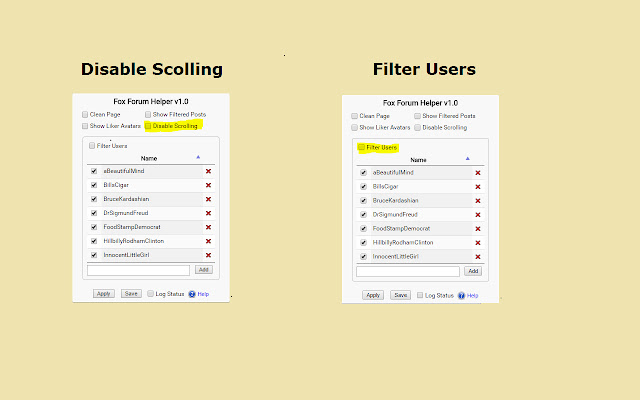
4) Control Scrolling - have control over whether lifefyre will scroll you down to a reply

5) Filter Users - remove posts from selected users before you see them


ABOUT PERMISSIONS
As a page extension limited to access only to foxnews.com no special permissions are requested or needed.

HELP & SUGGESTIONS
Help Center http://hollies.pw/support/

CONTACT
[email protected]
Informações Básicas da Extensão
| Nome |  Fox Forum Helper Fox Forum Helper |
| ID | jlnejgkemehilbgepofeiicpljbhfiln |
| URL Oficial | https://chrome.google.com/webstore/detail/fox-forum-helper/jlnejgkemehilbgepofeiicpljbhfiln |
| Descrição | Add function (and Fun!) to the Fox News Forum. |
| Tamanho do Arquivo | 171 KB |
| Contagem de Instalações | 10 |
| Versão Atual | 2.5.0 |
| Última Atualização | 2017-09-20 |
| Data de Publicação | 2017-09-20 |
| Classificação | 4.20/5 Total de 5 Avaliações |
| Desenvolvedor | Hollies |
| [email protected] | |
| Tipo de Pagamento | free |
| Site da Extensão | http://hollies.pw/ |
| URL da Página de Ajuda | http://hollies.pw/static/ffh/support/ |
| URL da Página de Política de Privacidade | http://hollies.pw/static/privacy |
| Idiomas Suportados | en-US |
| manifest.json | |
{
    "update_url": "https:\/\/clients2.google.com\/service\/update2\/crx",
    "manifest_version": 2,
    "minimum_chrome_version": "22.0.0.0",
    "name": "Fox Forum Helper",
    "description": "Add function (and Fun!) to the Fox News Forum.",
    "version": "2.5.0",
    "icons": {
        "128": "images\/icon.png"
    },
    "page_action": {
        "default_icon": "images\/icon.png",
        "default_title": "Fox Forum Helper",
        "default_popup": "pop-up\/popup.html"
    },
    "background": {
        "scripts": [
            "shared\/jquery-3.2.1.slim.min.js",
            "shared\/globals.js",
            "event-page\/settings.js",
            "event-page\/event-page.js"
        ],
        "persistent": false
    },
    "content_scripts": [
        {
            "matches": [
                "*:\/\/*.foxnews.com\/*"
            ],
            "js": [
                "shared\/jquery-3.2.1.slim.min.js",
                "shared\/globals.js",
                "content-scripts\/listener.js",
                "content-scripts\/Module_CleanPage.js",
                "content-scripts\/Module_XhrInterceptor.js"
            ]
        },
        {
            "matches": [
                "*:\/\/spoxy-shard4.spot.im\/*"
            ],
            "js": [
                "shared\/underscore-1.8.3.min.js",
                "shared\/jquery-3.2.1.slim.min.js",
                "shared\/d3.v3.min.js",
                "shared\/globals.js",
                "content-scripts2\/Module_ActivityGraph.js",
                "content-scripts2\/Module_AvatarSwapper.js",
                "content-scripts2\/Module_CleanComments.js",
                "content-scripts2\/Module_CommentObserver.js",
                "content-scripts2\/Module_Editor.js",
                "content-scripts2\/Module_FilterUsers.js",
                "content-scripts2\/Module_Liker.js",
                "content-scripts2\/Module_Settings.js",
                "content-scripts2\/main.js"
            ],
            "all_frames": true
        }
    ],
    "permissions": [
        "activeTab",
        "storage",
        "http:\/\/foxnews.com\/*"
    ],
    "web_accessible_resources": [
        "content-scripts\/disable-scrolling.js",
        "content-scripts\/xhr-interceptor.js",
        "content-scripts2\/icons\/blank-check-box.svg",
        "content-scripts2\/icons\/cancel-button.svg",
        "content-scripts2\/icons\/check-box.svg",
        "content-scripts2\/icons\/close-arrow.svg",
        "content-scripts2\/icons\/open-arrow.svg",
        "content-scripts2\/icons\/ok.svg"
    ]
} | |