右クリックからレシピ検索(クックパッドなぞり検索)
ウェブ上の文字をなぞってクックパッドを検索できます
O que é 右クリックからレシピ検索(クックパッドなぞり検索)?
右クリックからレシピ検索(クックパッドなぞり検索) é uma extensão do Chrome desenvolvida por clover, e sua principal característica é "ウェブ上の文字をなぞってクックパッドを検索できます".
Capturas de Tela da Extensão
Baixar o arquivo CRX da Extensão 右クリックからレシピ検索(クックパッドなぞり検索)
Baixe arquivos de extensão 右クリックからレシピ検索(クックパッドなぞり検索) no formato crx, instale manualmente as extensões do Chrome no navegador ou compartilhe os arquivos crx com amigos para instalar facilmente as extensões do Chrome.
Instruções de Uso da Extensão
                        なぞり検索用拡張機能です。

■使い方
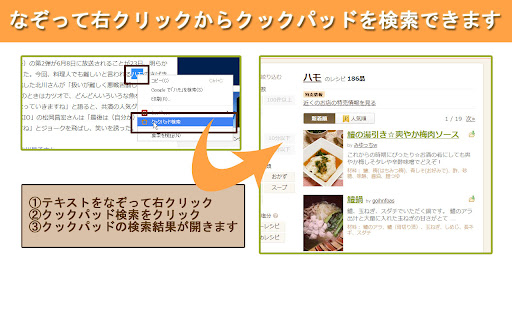
1.ニュースサイトやブログのテキストをなぞります。
2.右クリックしてクックパッド検索をクリックします。

■更新履歴
v1.0.0 一般公開
Informações Básicas da Extensão
| Nome |  右クリックからレシピ検索(クックパッドなぞり検索) 右クリックからレシピ検索(クックパッドなぞり検索) |
| ID | kcmdechfafmngeajhaakccohdmcoaipj |
| URL Oficial | https://chromewebstore.google.com/detail/%E5%8F%B3%E3%82%AF%E3%83%AA%E3%83%83%E3%82%AF%E3%81%8B%E3%82%89%E3%83%AC%E3%82%B7%E3%83%94%E6%A4%9C%E7%B4%A2%E3%82%AF%E3%83%83%E3%82%AF%E3%83%91%E3%83%83%E3%83%89%E3%81%AA%E3%81%9E%E3%82%8A%E6%A4%9C%E7%B4%A2/kcmdechfafmngeajhaakccohdmcoaipj |
| Descrição | ウェブ上の文字をなぞってクックパッドを検索できます |
| Tamanho do Arquivo | 8.62 KB |
| Contagem de Instalações | 111 |
| Versão Atual | 1.0.0 |
| Última Atualização | 2014-04-25 |
| Data de Publicação | 2014-04-24 |
| Desenvolvedor | clover |
| Tipo de Pagamento | free |
| Idiomas Suportados | ja |
| manifest.json | |
{
    "update_url": "https:\/\/clients2.google.com\/service\/update2\/crx",
    "manifest_version": 2,
    "name": "\u53f3\u30af\u30ea\u30c3\u30af\u304b\u3089\u30ec\u30b7\u30d4\u691c\u7d22(\u30af\u30c3\u30af\u30d1\u30c3\u30c9\u306a\u305e\u308a\u691c\u7d22)",
    "version": "1.0.0",
    "description": "\u30a6\u30a7\u30d6\u4e0a\u306e\u6587\u5b57\u3092\u306a\u305e\u3063\u3066\u30af\u30c3\u30af\u30d1\u30c3\u30c9\u3092\u691c\u7d22\u3067\u304d\u307e\u3059",
    "background": {
        "scripts": [
            "background.js"
        ]
    },
    "permissions": [
        "contextMenus"
    ],
    "icons": {
        "16": "images\/icon16.png",
        "32": "images\/icon32.png",
        "64": "images\/icon64.png",
        "128": "images\/icon128.png"
    }
} | |