Open Frame
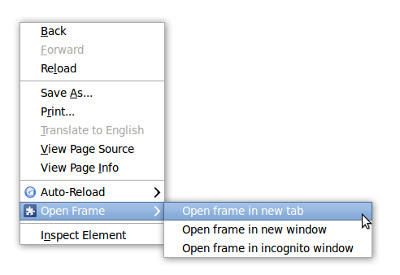
Adds context menu items to open a frame (or iframe) in the current tab, a new tab, new window, or incognito window.
O que é Open Frame?
Open Frame é uma extensão do Chrome desenvolvida por zboogs, e sua principal característica é "Adds context menu items to open a frame (or iframe) in the current tab, a new tab, new window, or incognito window.".
Capturas de Tela da Extensão
Baixar o arquivo CRX da Extensão Open Frame
Baixe arquivos de extensão Open Frame no formato crx, instale manualmente as extensões do Chrome no navegador ou compartilhe os arquivos crx com amigos para instalar facilmente as extensões do Chrome.
Instruções de Uso da Extensão
                        Chrome recently removed the "Open frame in new tab", and related context menu items. This extension adds them back. It allows you to open a frame or iframe from any webpage in a new tab, new window, or new incognito window. Or you can copy the URL to the clipboard for later use.

Version 7 removes the need to have access to the URLs you visit, since the tabs extension API has been updated such that it is no longer required. Yay. It also fixes the bug where "open in this tab" did not work.
Informações Básicas da Extensão
| Nome |  Open Frame Open Frame |
| ID | kdhjgkkaacdhdioocfbpmhjidbinfajj |
| URL Oficial | https://chrome.google.com/webstore/detail/open-frame/kdhjgkkaacdhdioocfbpmhjidbinfajj |
| Descrição | Adds context menu items to open a frame (or iframe) in the current tab, a new tab, new window, or incognito window. |
| Tamanho do Arquivo | 11.22 KB |
| Contagem de Instalações | 64,139 |
| Versão Atual | 7 |
| Última Atualização | 2014-05-11 |
| Data de Publicação | 2014-05-11 |
| Classificação | 4.07/5 Total de 219 Avaliações |
| Desenvolvedor | zboogs |
| Tipo de Pagamento | free |
| Idiomas Suportados | en |
| manifest.json | |
{
    "update_url": "https:\/\/clients2.google.com\/service\/update2\/crx",
    "name": "Open Frame",
    "manifest_version": 2,
    "description": "Adds context menu items to open a frame (or iframe) in the current tab, a new tab, new window, or incognito window.",
    "version": "7",
    "permissions": [
        "clipboardWrite",
        "contextMenus"
    ],
    "background": {
        "scripts": [
            "background.js"
        ],
        "persistent": false
    },
    "icons": {
        "16": "icon16.png",
        "48": "icon48.png",
        "128": "icon128.png"
    }
} | |