Harambe
Dicks Out For Harambe
O que é Harambe?
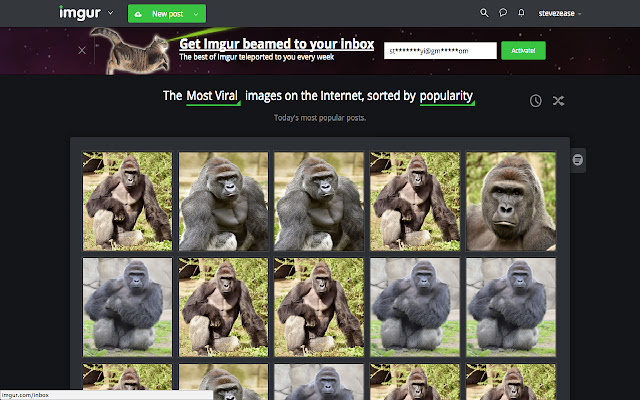
Harambe é uma extensão do Chrome desenvolvida por Steven Jin, e sua principal característica é "Dicks Out For Harambe".
Capturas de Tela da Extensão


Baixar o arquivo CRX da Extensão Harambe
Baixe arquivos de extensão Harambe no formato crx, instale manualmente as extensões do Chrome no navegador ou compartilhe os arquivos crx com amigos para instalar facilmente as extensões do Chrome.
Instruções de Uso da Extensão
                        Have a friend you want to prank? Hate that jerk Todd and want to get even?
Share with them the joy of Harambe

It's Easy:
While they're away from their computer:
Step 1. Go to Chrome
Step 2. Go to the extensions page by googling "Chrome Extensions" & clicking on the first link
Step 3. Search in extensions search "Harambe Pictures"
Step 4. install the top result

Now all of his/her pictures will turn into Harambe
Want to go one step further? Right click on the extension and click: "Hide in Chrome Menu."
They'll be freaking out for the next hour

This extension changes all images on a page to Harambe which then checks for changes on a 10 second interval.
Informações Básicas da Extensão
| Nome |  Harambe Harambe |
| ID | mkghponibaehackhmaijeonapklpndlc |
| URL Oficial | https://chrome.google.com/webstore/detail/harambe/mkghponibaehackhmaijeonapklpndlc |
| Descrição | Dicks Out For Harambe |
| Tamanho do Arquivo | 1.98 MB |
| Contagem de Instalações | 16 |
| Versão Atual | 1.3.1 |
| Última Atualização | 2018-01-07 |
| Data de Publicação | 2018-01-07 |
| Classificação | 2.83/5 Total de 6 Avaliações |
| Desenvolvedor | Steven Jin |
| [email protected] | |
| Tipo de Pagamento | free |
| Idiomas Suportados | en |
| manifest.json | |
{
    "update_url": "https:\/\/clients2.google.com\/service\/update2\/crx",
    "manifest_version": 2,
    "name": "Harambe",
    "description": "Dicks Out For Harambe",
    "version": "1.3.1",
    "content_scripts": [
        {
            "matches": [
                "http:\/\/*\/*",
                "https:\/\/*\/*"
            ],
            "js": [
                "harambe.js",
                "textswapper.js"
            ]
        }
    ],
    "web_accessible_resources": [
        "1.jpg",
        "2.jpg",
        "3.jpg",
        "4.jpg",
        "5.jpg",
        "6.jpg",
        "7.jpg",
        "8.jpg",
        "9.jpg",
        "10.jpg"
    ],
    "browser_action": {
        "default_icon": "icon.png",
        "default_popup": "popup.html"
    },
    "permissions": [
        "activeTab",
        "https:\/\/ajax.googleapis.com\/"
    ]
} | |