Url Opener - Opens pasted URL in new tab.
Productivity Tool for opening multiple url pasted in the given box. more feature will be addded in the coming time.
O que é Url Opener - Opens pasted URL in new tab.?
Url Opener - Opens pasted URL in new tab. é uma extensão do Chrome desenvolvida por http://ratankumar.org, e sua principal característica é "Productivity Tool for opening multiple url pasted in the given box. more feature will be addded in the coming time.".
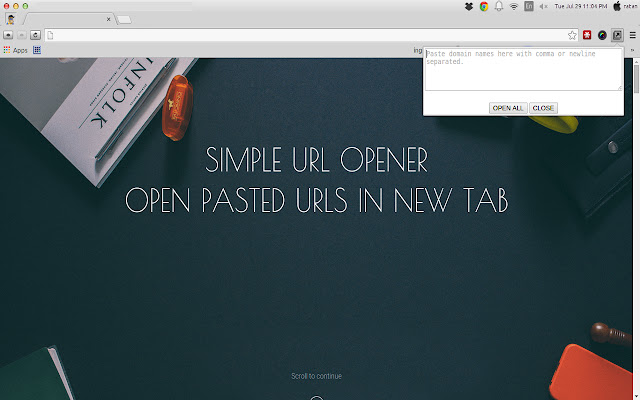
Capturas de Tela da Extensão
Baixar o arquivo CRX da Extensão Url Opener - Opens pasted URL in new tab.
Baixe arquivos de extensão Url Opener - Opens pasted URL in new tab. no formato crx, instale manualmente as extensões do Chrome no navegador ou compartilhe os arquivos crx com amigos para instalar facilmente as extensões do Chrome.
Instruções de Uso da Extensão
Enter each URL in new line or comma separated and click the "Open All". The app will then open all the pages in separate tabs. Informações Básicas da Extensão
| Nome |  Url Opener - Opens pasted URL in new tab. Url Opener - Opens pasted URL in new tab. |
| ID | npigammimfppobbaloflgbfnknhkgooo |
| URL Oficial | https://chrome.google.com/webstore/detail/url-opener-opens-pasted-u/npigammimfppobbaloflgbfnknhkgooo |
| Descrição | Productivity Tool for opening multiple url pasted in the given box. more feature will be addded in the coming time. |
| Tamanho do Arquivo | 35.29 KB |
| Contagem de Instalações | 34 |
| Versão Atual | 1.0 |
| Última Atualização | 2014-07-29 |
| Data de Publicação | 2014-07-29 |
| Classificação | 2.00/5 Total de 1 Avaliações |
| Desenvolvedor | http://ratankumar.org |
| [email protected] | |
| Tipo de Pagamento | free |
| URL da Página de Ajuda | http://ratankumar.org |
| Idiomas Suportados | en |
| manifest.json | |
{
    "update_url": "https:\/\/clients2.google.com\/service\/update2\/crx",
    "name": "Url Opener - Opens pasted URL in new tab. ",
    "description": "Productivity Tool for opening multiple url pasted in the given box. more feature will be addded in the coming time.",
    "version": "1.0",
    "permissions": [
        "tabs",
        "http:\/\/*\/*",
        "https:\/\/*\/*"
    ],
    "icons": {
        "16": "icon16.png",
        "48": "icon48.png",
        "128": "icon128.png"
    },
    "browser_action": {
        "default_title": "Url-Opener",
        "default_icon": {
            "19": "icon48.png",
            "38": "icon48.png"
        },
        "default_popup": "popup.html"
    },
    "manifest_version": 2
} | |