Knockoutjs context debugger
Shows the knockout context & data for the selected dom node in a sidebar of the elements pane.
O que é Knockoutjs context debugger?
Knockoutjs context debugger é uma extensão do Chrome desenvolvida por elijahzemlak733, e sua principal característica é "Shows the knockout context & data for the selected dom node in a sidebar of the elements pane.".
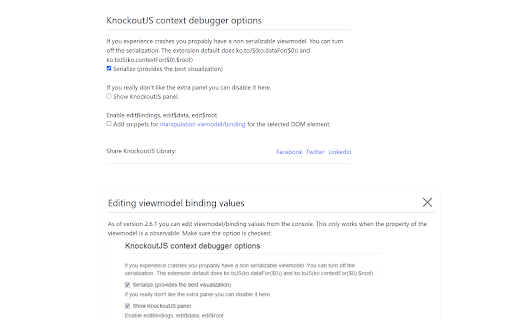
Capturas de Tela da Extensão


Baixar o arquivo CRX da Extensão Knockoutjs context debugger
Baixe arquivos de extensão Knockoutjs context debugger no formato crx, instale manualmente as extensões do Chrome no navegador ou compartilhe os arquivos crx com amigos para instalar facilmente as extensões do Chrome.
Instruções de Uso da Extensão
                        Product features and usage:
    - Extension supports developers to easily debugger value variables when using the "KnockoutJs" library for their html files. With the form showing the removal & data context for the selected dom button in the sidebar of the element pane.
    - Knockoutjs debugging extension.
         + Adds an additional sidebar in the element pane of chrome dev tools with knockout context and relevant data for the selected element. Very useful if you have large/nested views.
         + Very usefull if you got large/nested viewmodels.
         + Allows adding traces to everything observable/computable.
         + Allows editing of observables from the dashboard.

So to use the extension, the user's html file must download and use the KnockoutJS library (knockoutjs.com).

MIT license.
Tip (based on comments)
You can view the content of any observable in the viewmodel in the '$root_toJS' variable.

------ Change Log -------

Version-2.6.7: Add "Library Knockout Js" sharing feature to social networks: Twitter, LinkedIn and quickly share links to newsfeed facebook using post api.
Informações Básicas da Extensão
| Nome |  Knockoutjs context debugger Knockoutjs context debugger |
| ID | oddcpmchholgcjgjdnfjmildmlielhof |
| URL Oficial | https://chromewebstore.google.com/detail/knockoutjs-context-debugg/oddcpmchholgcjgjdnfjmildmlielhof |
| Descrição | Shows the knockout context & data for the selected dom node in a sidebar of the elements pane. |
| Tamanho do Arquivo | 1.12 MB |
| Contagem de Instalações | 26,937 |
| Versão Atual | 2.6.8 |
| Última Atualização | 2023-11-01 |
| Data de Publicação | 2014-08-07 |
| Classificação | 4.28/5 Total de 186 Avaliações |
| Desenvolvedor | elijahzemlak733 |
| [email protected] | |
| Tipo de Pagamento | free |
| URL da Página de Política de Privacidade | https://sites.google.com/view/transformtext/home |
| Idiomas Suportados | en |
| manifest.json | |
{
    "update_url": "https:\/\/clients2.google.com\/service\/update2\/crx",
    "background": {
        "service_worker": "service-worker-loader.js",
        "type": "module"
    },
    "version": "2.6.8",
    "manifest_version": 3,
    "name": "Knockoutjs context debugger",
    "description": "Shows the knockout context & data for the selected dom node in a sidebar of the elements pane.",
    "options_ui": {
        "page": "src\/options\/index.html",
        "open_in_tab": true
    },
    "devtools_page": "src\/devtool\/devtool.html",
    "content_scripts": [
        {
            "js": [
                "assets\/content-script-loader.index.ts.7c64ed84.6df94f50.js"
            ],
            "matches": [
                "https:\/\/*.facebook.com\/*",
                "https:\/\/twitter.com\/*",
                "https:\/\/*.linkedin.com\/*"
            ]
        }
    ],
    "host_permissions": [
        "https:\/\/*.facebook.com\/*",
        "https:\/\/twitter.com\/*",
        "https:\/\/*.linkedin.com\/*"
    ],
    "permissions": [
        "storage",
        "declarativeNetRequest"
    ],
    "icons": {
        "128": "icon_128.png"
    },
    "web_accessible_resources": [
        {
            "matches": [
                "https:\/\/*.facebook.com\/*",
                "https:\/\/*.linkedin.com\/*",
                "https:\/\/twitter.com\/*"
            ],
            "resources": [
                "assets\/index.ts.7c64ed84.js"
            ],
            "use_dynamic_url": true
        }
    ]
} | |