Virtual Sapiens Sidekick
Newest Features: - Framing updates. More accurate tools to help perfect your framing. - Stealth mode is here! If you'd like…
O que é Virtual Sapiens Sidekick?
Virtual Sapiens Sidekick é uma extensão do Chrome desenvolvida por http://virtualsapiens.co, e sua principal característica é " Newest Features: - Framing updates. More accurate tools to help perfect your framing. - Stealth mode is here! If you'd like…".
Capturas de Tela da Extensão


Baixar o arquivo CRX da Extensão Virtual Sapiens Sidekick
Baixe arquivos de extensão Virtual Sapiens Sidekick no formato crx, instale manualmente as extensões do Chrome no navegador ou compartilhe os arquivos crx com amigos para instalar facilmente as extensões do Chrome.
Instruções de Uso da Extensão
                        Newest Features:

- Framing updates. More accurate tools to help perfect your framing.
- Stealth mode is here! If you'd like your post-call analytics but without the real-time nudges, head to your settings and enable Stealth Mode.
 - Estimated speak share now displayed in real-time.

 Previous Updates:
 - Bug fixes and performance updates.
 - Advanced audio/video setting allows you to update the focal length of your camera. Use this if you find the Sidekick incorrectly thinking you are too close/far to the screen.
  - Sidekick will auto-close if a person is not detected after 4 1/2 minutes
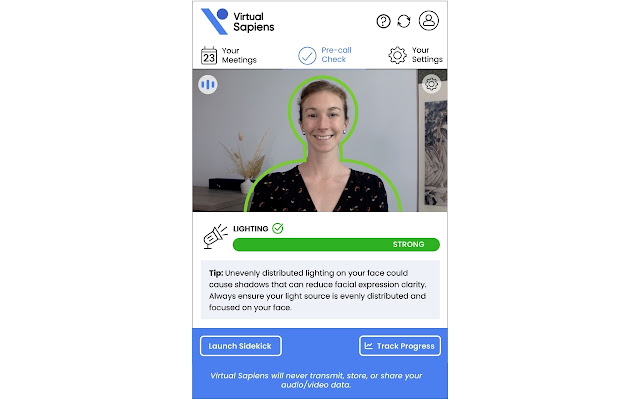
  -  Lighting analysis algorithm updated
   - All new and improved machine learning models! Enjoy more accurate and more responsive results with this new release.
   - New detection of repetitive body movements such as swiveling or rocking in your chair.
   - Sidekick+ users now have access to our full-featured dashboards. Upgrade today to track your progress and level up your communication skills.
   - Major code updates to improve performance!
   - Rapport Building and Empathy has been updated to Trustworthiness
   - View reports for recent calls in the "Past Calls" tab.


   * Note, PC users who wish to use the Sidekick with desktop video applications (e.g. Zoom Desktop) will need to install the Virtual Sapiens Virtual Camera to allow camera access to multiple applications. Easy installation instructions are included in onboarding screens.
~~~~~~~~~~~~~~~~~~~~~~~~~~~~~~~~~~~~~~~~~~~~~~~~~~~~~~
The Virtual Sapiens Sidekick seamlessly provides in-call encouragements and nudges to support improved awareness, comfort and confidence on video calls. The Sidekick is intended to amplify existing training programs and open up access to quality communication training throughout an organization.

The Sidekick is a Chrome extension that seamlessly pairs with your preferred calendar and video conferencing platforms. Users receive personalized feedback on their video setup, body language and certain vocal cues. We have auto-launch and manual launch capability so users can receive feedback during video events, or use the Sidekick to practice and receive feedback on important upcoming pitches and presentations.

The Sidekick is seamlessly integrated with Zoom, Google Meet, Microsoft Teams and more,  and will automatically launch and end at the start/stop of your video meetings.
Informações Básicas da Extensão
| Nome |  Virtual Sapiens Sidekick Virtual Sapiens Sidekick |
| ID | pcanmmllkialcnahemkcdopdgbfdfjac |
| URL Oficial | https://chrome.google.com/webstore/detail/pcanmmllkialcnahemkcdopdgbfdfjac |
| Descrição | Newest Features: - Framing updates. More accurate tools to help perfect your framing. - Stealth mode is here! If you'd like… |
| Tamanho do Arquivo | 80.97 MB |
| Contagem de Instalações | 187 |
| Versão Atual | 0.0.22 |
| Última Atualização | 2023-02-23 |
| Data de Publicação | 2021-12-22 |
| Classificação | 5.00/5 Total de 3 Avaliações |
| Desenvolvedor | http://virtualsapiens.co |
| [email protected] | |
| Tipo de Pagamento | free |
| Site da Extensão | https://virtualsapiens.co |
| URL da Página de Ajuda | https://www.virtualsapiens.co/faqs |
| URL da Página de Política de Privacidade | https://www.virtualsapiens.co/privacy-policy |
| Idiomas Suportados | en-US |
| manifest.json | |
{
    "update_url": "https:\/\/clients2.google.com\/service\/update2\/crx",
    "version": "0.0.22",
    "manifest_version": 2,
    "short_name": "VS",
    "name": "Virtual Sapiens Sidekick",
    "background": {
        "scripts": [
            "background.bundle.js"
        ],
        "persistent": true
    },
    "icons": {
        "48": "logo-head.png"
    },
    "permissions": [
        "alarms",
        "tabs",
        "cookies",
        "storage",
        "background",
        "notifications",
        "contentSettings",
        "system.display",
        "unlimitedStorage",
        "*:\/\/sidekick.virtualsapiens.co\/*"
    ],
    "content_security_policy": "script-src 'self' 'unsafe-eval' http:\/\/localhost:3000; object-src 'self';",
    "browser_action": {
        "default_popup": "popup.html",
        "default_title": "Virtual Sapiens Sidekick"
    },
    "externally_connectable": {
        "matches": [
            "*:\/\/*.virtualsapiens.co\/*"
        ]
    }
} | |