Blue Canoe Pronunciation Dictionary
Learn how to say any English word and be instantly understood, using the award-winning Color Vowel®️ System.
O que é Blue Canoe Pronunciation Dictionary?
Blue Canoe Pronunciation Dictionary é uma extensão do Chrome desenvolvida por https://bluecanoelearning.com, e sua principal característica é "Learn how to say any English word and be instantly understood, using the award-winning Color Vowel®️ System.".
Capturas de Tela da Extensão


Baixar o arquivo CRX da Extensão Blue Canoe Pronunciation Dictionary
Baixe arquivos de extensão Blue Canoe Pronunciation Dictionary no formato crx, instale manualmente as extensões do Chrome no navegador ou compartilhe os arquivos crx com amigos para instalar facilmente as extensões do Chrome.
Instruções de Uso da Extensão
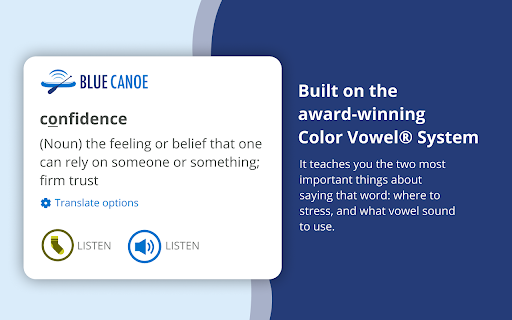
                        Double-click and then right-click on any word to see its stress and vowel.

Simply select a word and get a pop-up that teaches you the two most important things about saying that word: where to put the stress, and what vowel sound (color) you should use. This dictionary is built on the award-winning Color Vowel® System, used by more than 10,000+ ESL teachers around the world, and now you can use it, for free, on your computer.

Frustrated by all the complexities and “exceptions” of English pronunciation? Tired of not being able to listen and then accurately repeat a word? You are not alone! Blue Canoe and the Color Vowel System will help!

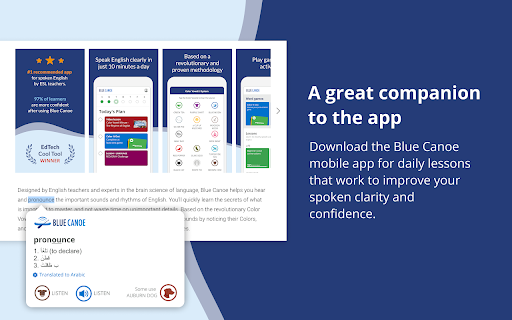
Visit www.bluecanoelearning.com for more information. Download the Blue Canoe mobile app for daily lessons that work to improve your spoken clarity and confidence.

Watch this 3-minute video to learn more about the most successful way to improve your spoken English. https://youtu.be/21XNGIefcR8

* Move from just knowing what a word means, to confidently using a word when you talk.
* Double-click to select, and then right-click on any word to get a pop-up that tells you which syllable to stress (make longer), and what vowel sound (color) you should use, as you say the word out loud.
* Listen to the vowel sound recording and then the word recording, and the visual and musical parts of your brain will help you to “hear” it in a way that is not possible with just your language brain.
* Go to the Options in Blue Canoe icon in the browser extension bar to change how you call up the pop up, if desired.
* Use the Blue Canoe mobile AI app to learn and practice so much more about speaking English with clarity and confidence. Get it from your mobile App Store.

NOTE: After installing this extension, refresh any previously opened tabs to use it on those tabs. According to the rules of the Chrome Web Store, it will also not work on the store pages.
Informações Básicas da Extensão
| Nome |  Blue Canoe Pronunciation Dictionary Blue Canoe Pronunciation Dictionary |
| ID | pjnkabicgidoflkilpobciceedcamkpo |
| URL Oficial | https://chromewebstore.google.com/detail/blue-canoe-pronunciation/pjnkabicgidoflkilpobciceedcamkpo |
| Descrição | Learn how to say any English word and be instantly understood, using the award-winning Color Vowel®️ System. |
| Tamanho do Arquivo | 969 KB |
| Contagem de Instalações | 2,269 |
| Versão Atual | 1.2.0 |
| Última Atualização | 2020-12-23 |
| Data de Publicação | 2020-08-27 |
| Classificação | 5.00/5 Total de 19 Avaliações |
| Desenvolvedor | https://bluecanoelearning.com |
| [email protected] | |
| Tipo de Pagamento | free |
| Site da Extensão | https://www.bluecanoelearning.com |
| URL da Página de Política de Privacidade | https://bluecanoelearning.com/privacy-policy |
| Idiomas Suportados | en-US |
| manifest.json | |
{
"update_url": "https:\/\/clients2.google.com\/service\/update2\/crx",
"author": "Blue Canoe Learning",
"manifest_version": 2,
"name": "Blue Canoe Pronunciation Dictionary",
"version": "1.2.0",
"description": "Learn how to say any English word and be instantly understood, using the award-winning Color Vowel\u00ae\ufe0f System.",
"icons": {
"48": "icons\/logo_48.png",
"64": "icons\/logo_64.png",
"96": "icons\/logo_96.png",
"128": "icons\/logo_128.png",
"512": "icons\/logo_512.png",
"1024": "icons\/logo_1024.png"
},
"options_ui": {
"page": "options\/options.html",
"chrome_style": true
},
"browser_action": {
"default_icon": {
"19": "icons\/logo_19.png",
"38": "icons\/logo_38.png"
},
"default_title": "Blue Canoe"
},
"content_scripts": [
{
"matches": [
" | |