Kaizan
Guiding companies on what they need to do to retain and grow clients.
O que é Kaizan?
Kaizan é uma extensão do Chrome desenvolvida por Kaizan.ai, e sua principal característica é "Guiding companies on what they need to do to retain and grow clients.".
Capturas de Tela da Extensão

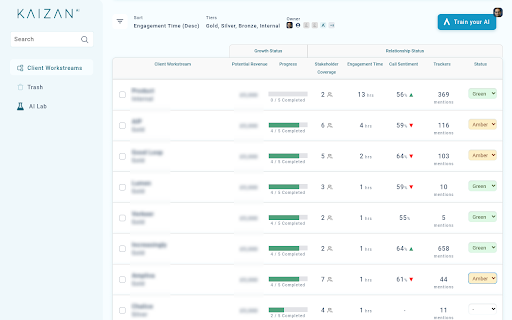
Baixar o arquivo CRX da Extensão Kaizan
Baixe arquivos de extensão Kaizan no formato crx, instale manualmente as extensões do Chrome no navegador ou compartilhe os arquivos crx com amigos para instalar facilmente as extensões do Chrome.
Instruções de Uso da Extensão
                        Kaizan is an AI for client success teams to help them retain and grow their clients.

Kaizan assists you in managing client relationships by automating your workflows and surfacing critical information to help keep clients happy.

Try the beta now, and see how Kaizan's AI can track your key action items, risks, decisions and opportunities from your client calls.
Informações Básicas da Extensão
| Nome |  Kaizan Kaizan |
| ID | pnefchnjggoocfabdhfobihodgokfdoe |
| URL Oficial | https://chromewebstore.google.com/detail/kaizan/pnefchnjggoocfabdhfobihodgokfdoe |
| Descrição | Guiding companies on what they need to do to retain and grow clients. |
| Tamanho do Arquivo | 2.37 MB |
| Contagem de Instalações | 260 |
| Versão Atual | 2023.10.26.1813 |
| Última Atualização | 2023-10-26 |
| Data de Publicação | 2023-01-17 |
| Desenvolvedor | Kaizan.ai |
| [email protected] | |
| Tipo de Pagamento | free |
| Site da Extensão | https://kaizan.ai |
| URL da Página de Ajuda | https://help.kaizan.ai |
| URL da Página de Política de Privacidade | https://help.kaizan.ai/en/articles/6028739-privacy-policy |
| Idiomas Suportados | en |
| manifest.json | |
{
    "update_url": "https:\/\/clients2.google.com\/service\/update2\/crx",
    "manifest_version": 3,
    "name": "Kaizan",
    "version": "2023.10.26.1813",
    "description": "Guiding companies on what they need to do to retain and grow clients.",
    "background": {
        "service_worker": "serviceWorker.js",
        "type": "module"
    },
    "content_scripts": [
        {
            "js": [
                "import-contentScript.js"
            ],
            "matches": [
                "*:\/\/meet.google.com\/*-*-*"
            ],
            "css": [
                "bundle.css",
                "assets\/css\/fonts.css",
                "assets\/css\/vars.css",
                "assets\/css\/text-styles.css",
                "assets\/css\/simplepicker.css"
            ],
            "run_at": "document_idle"
        },
        {
            "js": [
                "import-rtcScript.js"
            ],
            "matches": [
                "*:\/\/meet.google.com\/*-*-*"
            ],
            "run_at": "document_start"
        }
    ],
    "action": {
        "default_title": "Kaizan"
    },
    "icons": {
        "16": "assets\/icon16.png",
        "48": "assets\/icon48.png",
        "128": "assets\/icon128.png"
    },
    "declarative_net_request": {
        "rule_resources": [
            {
                "id": "kaizan-api-net-requests",
                "enabled": true,
                "path": "kaizan-api-net-requests.json"
            }
        ]
    },
    "permissions": [
        "cookies",
        "declarativeNetRequest",
        "tabs"
    ],
    "host_permissions": [
        "https:\/\/app.kaizan.ai\/*\/*",
        "https:\/\/meet.google.com\/*-*-*"
    ],
    "web_accessible_resources": [
        {
            "resources": [
                "rtc\/script\/index.js",
                "assets\/fonts\/*",
                "assets\/img\/*.svg"
            ],
            "matches": [
                "*:\/\/meet.google.com\/*"
            ]
        },
        {
            "resources": [
                "chunks\/*-*.js",
                "contentScript.js",
                "rtcScript.js"
            ],
            "matches": [
                "*:\/\/meet.google.com\/*",
                "https:\/\/app.kaizan.ai\/*",
                "https:\/\/meet.google.com\/*"
            ]
        }
    ]
} | |