Street View Randomizer
Random Street View from around the world inside a new tab.
Что такое Street View Randomizer?
Street View Randomizer - это расширение Chrome, разработанное jenya kats, и его основная функция - "Random Street View from around the world inside a new tab.".
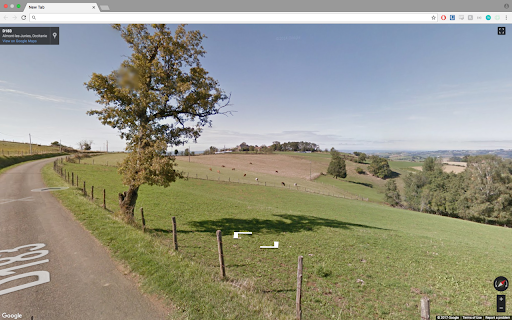
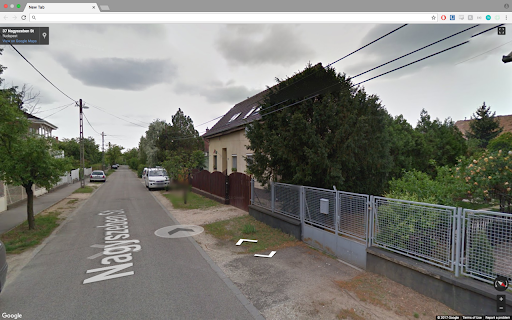
Снимки экрана расширения



Скачать файл CRX расширения Street View Randomizer
Скачайте файлы расширений Street View Randomizer в формате crx, установите расширения Chrome вручную в браузере или поделитесь файлами crx с друзьями, чтобы легко установить расширения Chrome.
Инструкции по использованию расширения
                        This extension will display a random panoramic street view any time you open a new tab.

UPDATE: I have received a spike in users, which is amazing! However, this means Google Maps has begun to charge me for requests from the application. I am working to overcome this obstacle and continue to make this usable and cost free for everyone. In the meantime, there is a quota on how many requests we are sending a day which can lead to some errors when you open a tab. Not very pretty :( Bear with me until I figure out a better system here.

Utilizes Google Maps API
Основная информация о расширении
| Название |  Street View Randomizer Street View Randomizer |
| ID | adjckibppkfmanaalenmabegaahkgcip |
| Официальный URL | https://chromewebstore.google.com/detail/street-view-randomizer/adjckibppkfmanaalenmabegaahkgcip |
| Описание | Random Street View from around the world inside a new tab. |
| Размер файла | 177 KB |
| Количество установок | 339 |
| Текущая Версия | 2.3 |
| Последнее Обновление | 2020-06-01 |
| Дата публикации | 2020-05-31 |
| Рейтинг | 4.91/5 Всего 11 оценок |
| Разработчик | jenya kats |
| Электронная почта | [email protected] |
| Тип оплаты | free |
| Поддерживаемые языки | en |
| manifest.json | |
{
    "update_url": "https:\/\/clients2.google.com\/service\/update2\/crx",
    "name": "Street View Randomizer",
    "manifest_version": 2,
    "version": "2.3",
    "description": "Random Street View from around the world inside a new tab.",
    "chrome_url_overrides": {
        "newtab": "index.html"
    },
    "background": {
        "persistent": false,
        "scripts": [
            "data.js"
        ]
    },
    "icons": {
        "32": "icon.png"
    },
    "content_security_policy": "script-src 'self' https:\/\/maps.googleapis.com\/; object-src 'self'",
    "permissions": [
        "https:\/\/maps.googleapis.com\/*"
    ],
    "browser_action": {
        "default_icon": "icon.png",
        "default_title": "Open a New Tab!"
    }
} | |