DogeGuard
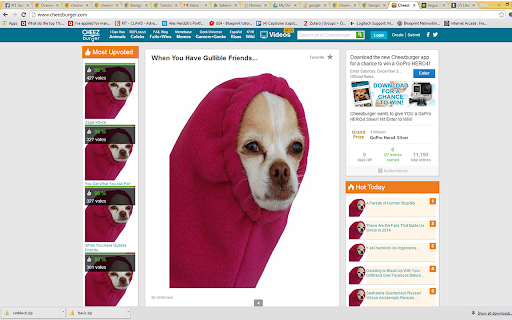
This extension will block all pictures hosted on cheezburger.com, and replace it with a silly picture of a chihuahua.
Что такое DogeGuard?
DogeGuard - это расширение Chrome, разработанное alex.j.herdzik, и его основная функция - "This extension will block all pictures hosted on cheezburger.com, and replace it with a silly picture of a chihuahua.".
Снимки экрана расширения
Скачать файл CRX расширения DogeGuard
Скачайте файлы расширений DogeGuard в формате crx, установите расширения Chrome вручную в браузере или поделитесь файлами crx с друзьями, чтобы легко установить расширения Chrome.
Инструкции по использованию расширения
Slight variation on a sample app, in which everything hosted on cheezburger.com is replaced by a silly picture of a chihuahua I found on tumblr. Основная информация о расширении
| Название |  DogeGuard DogeGuard |
| ID | aecmhjjghimigepncpjelhpkpagogcnc |
| Официальный URL | https://chromewebstore.google.com/detail/dogeguard/aecmhjjghimigepncpjelhpkpagogcnc |
| Описание | This extension will block all pictures hosted on cheezburger.com, and replace it with a silly picture of a chihuahua. |
| Размер файла | 8.48 KB |
| Количество установок | 46 |
| Текущая Версия | 1.0.1 |
| Последнее Обновление | 2014-12-12 |
| Дата публикации | 2014-12-12 |
| Рейтинг | 5.00/5 Всего 2 оценок |
| Разработчик | alex.j.herdzik |
| Тип оплаты | free |
| Официальный сайт расширения | https://31.media.tumblr.com/tumblr_m8pwmcn9wy1qbbiyo.jpg |
| URL страницы помощи | https://31.media.tumblr.com/tumblr_m8pwmcn9wy1qbbiyo.jpg |
| Поддерживаемые языки | en |
| manifest.json | |
{
"update_url": "https:\/\/clients2.google.com\/service\/update2\/crx",
"manifest_version": 2,
"name": "DogeGuard",
"description": "This extension will block all pictures hosted on cheezburger.com, and replace it with a silly picture of a chihuahua.",
"version": "1.0.1",
"background": {
"scripts": [
"triggerGuard.js",
"background.js"
],
"persistent": true
},
"permissions": [
"webRequest",
"webRequestBlocking",
" | |