Highlight This: finds and marks words
Automatically finds and highlights words and phrases on the web page according to your list
Что такое Highlight This: finds and marks words?
Highlight This: finds and marks words - это расширение Chrome, разработанное https://alaaqweider.online, и его основная функция - "Automatically finds and highlights words and phrases on the web page according to your list".
Снимки экрана расширения
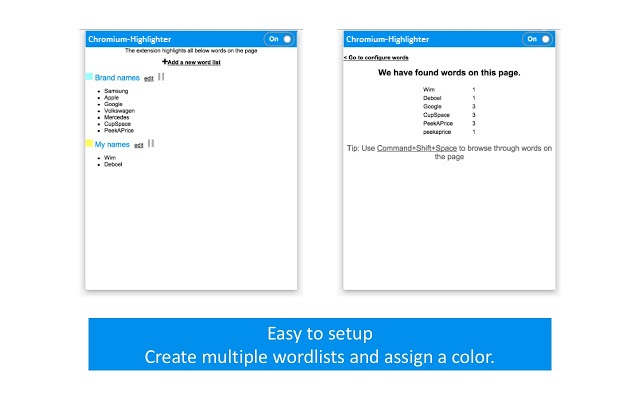
Скачать файл CRX расширения Highlight This: finds and marks words
Скачайте файлы расширений Highlight This: finds and marks words в формате crx, установите расширения Chrome вручную в браузере или поделитесь файлами crx с друзьями, чтобы легко установить расширения Chrome.
Инструкции по использованию расширения
                        Automatically finds and highlights words and phrases on the web page according to your list
- No registration required
- Organize your search words in groups and lists
- All data stored locally
- Auto-refreshes highlights on page reload and content changes
- Unlimited words and lists
- Free

Easy to use Chrome Extension that automatically searches for defined words in the current browser tab

and marks them in a text. Many more advanced features available through settings:
- Create color-coded keyword lists
- Disable highlighting on certain sites
- Export or import your settings and keyword lists
- Use lists from Pastebin

Changelog
1.1
*updated latest jquery 3.4.1
1.0
*Intial Release
Основная информация о расширении
| Название |  Highlight This: finds and marks words Highlight This: finds and marks words |
| ID | aflnhjcbpnknodmnmjjlphgcichcfbak |
| Официальный URL | https://chrome.google.com/webstore/detail/highlight-this-finds-and/aflnhjcbpnknodmnmjjlphgcichcfbak |
| Описание | Automatically finds and highlights words and phrases on the web page according to your list |
| Размер файла | 1.01 MB |
| Количество установок | 4,000 |
| Текущая Версия | 1.1 |
| Последнее Обновление | 2019-07-09 |
| Дата публикации | 2019-07-04 |
| Рейтинг | 3.00/5 Всего 1 оценок |
| Разработчик | https://alaaqweider.online |
| Электронная почта | [email protected] |
| Тип оплаты | free |
| Поддерживаемые языки | en,fr,nl,ru |
| manifest.json | |
{
    "update_url": "https:\/\/clients2.google.com\/service\/update2\/crx",
    "manifest_version": 2,
    "name": "__MSG_application_title__",
    "short_name": "Chromium-Highlighter",
    "description": "__MSG_application_description__",
    "default_locale": "en",
    "permissions": [
        "tabs",
        "contextMenus",
        "notifications",
        "activeTab",
        "alarms",
        "downloads",
        "storage"
    ],
    "icons": {
        "16": "Plugin16.png",
        "96": "Plugin96.png"
    },
    "background": {
        "scripts": [
            "libs\/sanitize-html\/sanitize-html.js",
            "extWordHighlighter.js"
        ]
    },
    "commands": {
        "ScrollHighlight": {
            "suggested_key": {
                "default": "Ctrl+Shift+Space",
                "mac": "Command+Shift+Space"
            },
            "description": "ScrollHighlight"
        }
    },
    "version": "1.1",
    "content_scripts": [
        {
            "matches": [
                "http:\/\/*\/*",
                "https:\/\/*\/*"
            ],
            "js": [
                "libs\/jquery\/jquery-3.4.1.js",
                "hilitor.js",
                "tabWordHighlighter.js"
            ],
            "css": [
                "highlightThis.css"
            ],
            "all_frames": true,
            "run_at": "document_start",
            "match_about_blank": true
        }
    ],
    "browser_action": {
        "default_icon": "Plugin16.png",
        "default_popup": "popup.html"
    }
} | |