Footinator
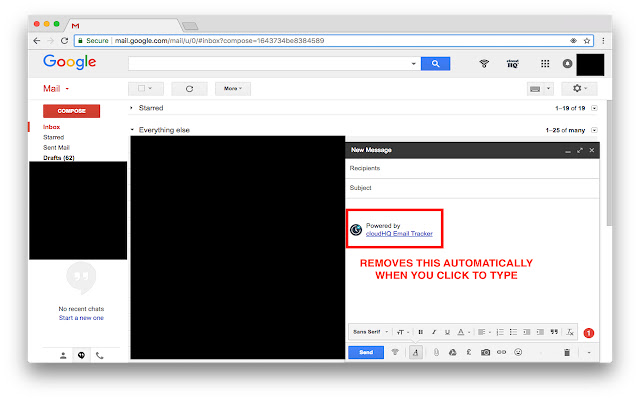
This extension removes the footer that cloudHQ puts at the bottom of their email.
Что такое Footinator?
Footinator - это расширение Chrome, разработанное The Ultimate Essay Guide, и его основная функция - "This extension removes the footer that cloudHQ puts at the bottom of their email.".
Снимки экрана расширения
Скачать файл CRX расширения Footinator
Скачайте файлы расширений Footinator в формате crx, установите расширения Chrome вручную в браузере или поделитесь файлами crx с друзьями, чтобы легко установить расширения Chrome.
Инструкции по использованию расширения
If you use the the Free Email Tracker from Cloud HQ to monitor sent emails and don't want to pay for it but also don't want to have the email tracker at the bottom. Then this is the extension for you. Using this removes the footer at the bottom of the email. Основная информация о расширении
| Название |  Footinator Footinator |
| ID | apbhojnkkiljllhnlcaookcpebpmnbmh |
| Официальный URL | https://chrome.google.com/webstore/detail/footinator/apbhojnkkiljllhnlcaookcpebpmnbmh |
| Описание | This extension removes the footer that cloudHQ puts at the bottom of their email. |
| Размер файла | 35.74 KB |
| Количество установок | 73 |
| Текущая Версия | 1 |
| Последнее Обновление | 2018-06-25 |
| Дата публикации | 2018-06-25 |
| Рейтинг | 3.00/5 Всего 2 оценок |
| Разработчик | The Ultimate Essay Guide |
| Электронная почта | [email protected] |
| Тип оплаты | free |
| URL страницы политики конфиденциальности | https://www.iubenda.com/privacy-policy/847740 |
| Поддерживаемые языки | en-GB |
| manifest.json | |
{
    "update_url": "https:\/\/clients2.google.com\/service\/update2\/crx",
    "manifest_version": 2,
    "name": "Footinator",
    "short_name": "Footinator",
    "description": "This extension removes the footer that cloudHQ puts at the bottom of their email.",
    "version": "1",
    "icons": {
        "16": "images\/email-16.png",
        "48": "images\/email-48.png",
        "128": "images\/email-128.png"
    },
    "permissions": [
        "tabs",
        "*:\/\/*.google.com\/*"
    ],
    "content_scripts": [
        {
            "matches": [
                "*:\/\/mail.google.com\/*"
            ],
            "js": [
                "thirdparty\/jquery-3.2.1.min.js",
                "js\/app.js"
            ]
        }
    ]
} | |