Inline Code Snippet Editor
Tired of fiddling around after copying a code snippet before pasting into your terminal?
Что такое Inline Code Snippet Editor?
Inline Code Snippet Editor - это расширение Chrome, разработанное https://cloudtutorials.co, и его основная функция - "Tired of fiddling around after copying a code snippet before pasting into your terminal?".
Снимки экрана расширения
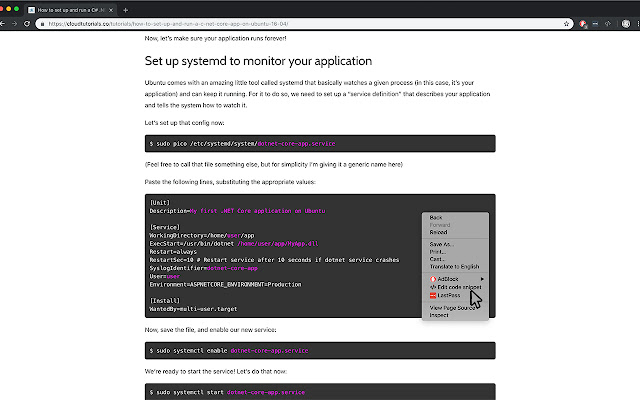
Скачать файл CRX расширения Inline Code Snippet Editor
Скачайте файлы расширений Inline Code Snippet Editor в формате crx, установите расширения Chrome вручную в браузере или поделитесь файлами crx с друзьями, чтобы легко установить расширения Chrome.
Инструкции по использованию расширения
                        The CloudTutorials Inline Snippet Editor adds a context menu to Chrome to allow for painless, unintrusive editing of code blocks on your favourite tutorial sites.

Currently supports blocks that are found in the HTML tags pre, code and div.terminal.
Основная информация о расширении
| Название |  Inline Code Snippet Editor Inline Code Snippet Editor |
| ID | bcapdlmkekidiigkolgppjgoadlobeal |
| Официальный URL | https://chrome.google.com/webstore/detail/inline-code-snippet-edito/bcapdlmkekidiigkolgppjgoadlobeal |
| Описание | Tired of fiddling around after copying a code snippet before pasting into your terminal? |
| Размер файла | 6.39 MB |
| Количество установок | 165 |
| Текущая Версия | 0.0.1 |
| Последнее Обновление | 2019-03-08 |
| Дата публикации | 2019-03-08 |
| Разработчик | https://cloudtutorials.co |
| Тип оплаты | free |
| Поддерживаемые языки | en-GB |
| manifest.json | |
{
    "update_url": "https:\/\/clients2.google.com\/service\/update2\/crx",
    "name": "Inline Code Snippet Editor",
    "version": "0.0.1",
    "manifest_version": 2,
    "description": "Tired of fiddling around after copying a code snippet before pasting into your terminal?",
    "homepage_url": "https:\/\/cloudtutorials.co\/inline-code-snippet-editor\/",
    "icons": {
        "16": "icons\/icon16.png",
        "48": "icons\/icon48.png",
        "128": "icons\/icon128.png"
    },
    "background": {
        "scripts": [
            "src\/bg\/background.js"
        ],
        "persistent": true
    },
    "permissions": [
        "contextMenus",
        "activeTab"
    ],
    "content_scripts": [
        {
            "matches": [
                "https:\/\/*\/*",
                "http:\/\/*\/*"
            ],
            "js": [
                "src\/inject\/inject.js"
            ]
        }
    ]
} | |