QR Code Generator
The easiest way to create all kinds of QR codes. Encrypt Text, URLs, Emails, Phonenumbers, SMS, WiFi IDs, Geolocations and Contacts.
Что такое QR Code Generator?
QR Code Generator - это расширение Chrome, разработанное limepix, и его основная функция - "The easiest way to create all kinds of QR codes. Encrypt Text, URLs, Emails, Phonenumbers, SMS, WiFi IDs, Geolocations and Contacts.".
Снимки экрана расширения
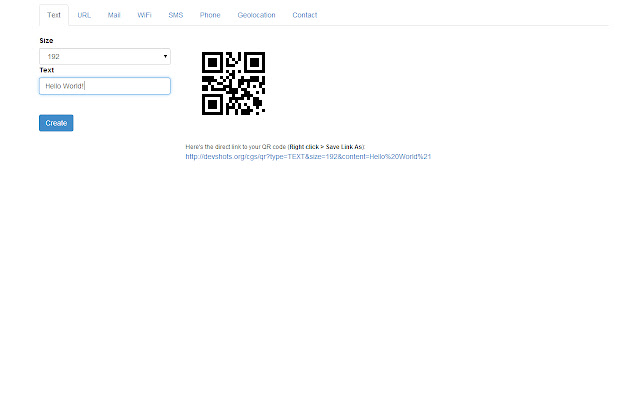


Скачать файл CRX расширения QR Code Generator
Скачайте файлы расширений QR Code Generator в формате crx, установите расширения Chrome вручную в браузере или поделитесь файлами crx с друзьями, чтобы легко установить расширения Chrome.
Инструкции по использованию расширения
                        The QR Code Generator is a simple and easy to use Chrome Extension, that gives you the possibilities to create different types of QR Codes as PNG images.

The currently available types are:

* Text
* URL
* SMS
* Phone / Dial
* Email
* Geolocation
* WiFi Network Identification
* Contact

Have fun :)
Основная информация о расширении
| Название |  QR Code Generator QR Code Generator |
| ID | bgljigeecopfljpcfbihbgdbmmhigmip |
| Официальный URL | https://chrome.google.com/webstore/detail/qr-code-generator/bgljigeecopfljpcfbihbgdbmmhigmip |
| Описание | The easiest way to create all kinds of QR codes. Encrypt Text, URLs, Emails, Phonenumbers, SMS, WiFi IDs, Geolocations and Contacts. |
| Размер файла | 411 KB |
| Количество установок | 255 |
| Текущая Версия | 1.2 |
| Последнее Обновление | 2014-07-16 |
| Дата публикации | 2014-07-16 |
| Рейтинг | 5.00/5 Всего 2 оценок |
| Разработчик | limepix |
| Электронная почта | [email protected] |
| Тип оплаты | free |
| Поддерживаемые языки | en |
| manifest.json | |
{
    "update_url": "https:\/\/clients2.google.com\/service\/update2\/crx",
    "manifest_version": 2,
    "name": "QR Code Generator",
    "short_name": "QRcodegen",
    "description": "The easiest way to create all kinds of QR codes. Encrypt Text, URLs, Emails, Phonenumbers, SMS, WiFi IDs, Geolocations and Contacts.",
    "version": "1.2",
    "permissions": [
        "http:\/\/devshots.org\/"
    ],
    "background": {
        "scripts": [
            "js\/background.js"
        ]
    },
    "browser_action": {
        "default_icon": {
            "19": "images\/logo_19.png",
            "38": "images\/logo_38.png",
            "48": "images\/logo_48.png"
        },
        "default_title": "Generate a QR code",
        "default_popup": "html\/popup.html"
    }
} | |