Send to Google Maps
Sends the current text selection with 1-Click to Google Maps.
Что такое Send to Google Maps?
Send to Google Maps - это расширение Chrome, разработанное Send To Maps, и его основная функция - "Sends the current text selection with 1-Click to Google Maps.".
Снимки экрана расширения


Скачать файл CRX расширения Send to Google Maps
Скачайте файлы расширений Send to Google Maps в формате crx, установите расширения Chrome вручную в браузере или поделитесь файлами crx с друзьями, чтобы легко установить расширения Chrome.
Инструкции по использованию расширения
                        This extension allows you to send a selected address on any website directly to Google Maps.

Therefore the extension adds an item to the Context Menu if text is selected. By right clicking on the selected text the context menu opens and you can choose between different options:

- Search for the selected text in Maps
- Show your current position in Maps
- If you need directions:
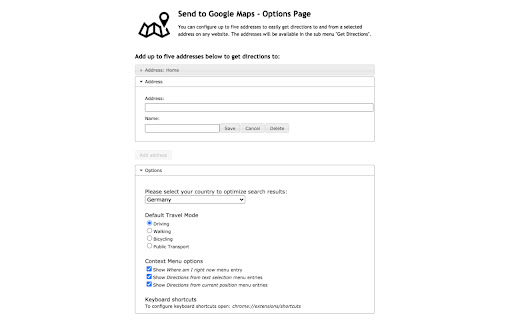
Just go to the options page and enter up to five favorite addresses. They will be available in the context menu to easily get directions.

Also, you can select company names, names of sights and a lot more on any webpage to get directions to. Just try it out! It's not limited to addresses only...
Основная информация о расширении
| Название |  Send to Google Maps Send to Google Maps |
| ID | bhggankplfegmjjngfmhfajedmiikolo |
| Официальный URL | https://chromewebstore.google.com/detail/send-to-google-maps/bhggankplfegmjjngfmhfajedmiikolo |
| Описание | Sends the current text selection with 1-Click to Google Maps. |
| Размер файла | 317 KB |
| Количество установок | 51,352 |
| Текущая Версия | 4.3 |
| Последнее Обновление | 2023-12-12 |
| Дата публикации | 2018-01-29 |
| Рейтинг | 4.04/5 Всего 146 оценок |
| Разработчик | Send To Maps |
| Электронная почта | [email protected] |
| Тип оплаты | free |
| Поддерживаемые языки | en |
| manifest.json | |
{
"update_url": "https:\/\/clients2.google.com\/service\/update2\/crx",
"name": "Send to Google Maps",
"version": "4.3",
"manifest_version": 3,
"description": "Sends the current text selection with 1-Click to Google Maps.",
"icons": {
"16": "img\/icon16.png",
"48": "img\/icon48.png",
"128": "img\/icon128.png"
},
"options_page": "options_new.html",
"background": {
"service_worker": "background-worker.js"
},
"content_scripts": [
{
"run_at": "document_start",
"matches": [
" | |