Gmail automatic BCC me by 010Pixel
A plugin for gmail to automatically BCC sender's email.
Что такое Gmail automatic BCC me by 010Pixel?
Gmail automatic BCC me by 010Pixel - это расширение Chrome, разработанное 010pixel, и его основная функция - "A plugin for gmail to automatically BCC sender's email.".
Снимки экрана расширения

Скачать файл CRX расширения Gmail automatic BCC me by 010Pixel
Скачайте файлы расширений Gmail automatic BCC me by 010Pixel в формате crx, установите расширения Chrome вручную в браузере или поделитесь файлами crx с друзьями, чтобы легко установить расширения Chrome.
Инструкции по использованию расширения
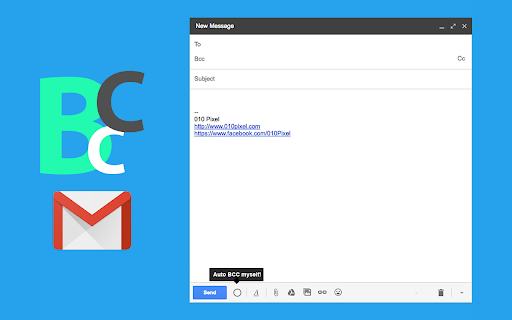
                        A very simple plugin to enable you to automatically BCC yourself in creating new email, replying and forwarding email. There is a button in enable/disable the feature in gmail itself.

How to:
- Click on "Compose" or "Reply" or "Reply all" or "Forward" button and you will automatically be BCCed
- To disable or renable this feature, just uncheck the checkbox at the bottom of the compose text popup.
Основная информация о расширении
| Название |  Gmail automatic BCC me by 010Pixel Gmail automatic BCC me by 010Pixel |
| ID | cdbbhmihggfhmhbbmabpkpflahdeodgo |
| Официальный URL | https://chromewebstore.google.com/detail/gmail-automatic-bcc-me-by/cdbbhmihggfhmhbbmabpkpflahdeodgo |
| Описание | A plugin for gmail to automatically BCC sender's email. |
| Размер файла | 438 KB |
| Количество установок | 734 |
| Текущая Версия | 1.1.3 |
| Последнее Обновление | 2017-05-22 |
| Дата публикации | 2017-05-21 |
| Рейтинг | 5.00/5 Всего 4 оценок |
| Разработчик | 010pixel |
| Электронная почта | [email protected] |
| Тип оплаты | free |
| Официальный сайт расширения | http://www.010pixel.com/ |
| URL страницы политики конфиденциальности | https://privacy.010pixel.com/chrome |
| Поддерживаемые языки | en |
| manifest.json | |
{
    "update_url": "https:\/\/clients2.google.com\/service\/update2\/crx",
    "manifest_version": 2,
    "name": "Gmail automatic BCC me by 010Pixel",
    "short_name": "Gmail-Automatic-BCC-Me",
    "description": "A plugin for gmail to automatically BCC sender's email.",
    "version": "1.1.3",
    "author": "010 Pixel",
    "permissions": [
        "https:\/\/mail.google.com\/",
        "https:\/\/inbox.google.com\/"
    ],
    "browser_action": {
        "default_icon": "images\/icon16.png"
    },
    "icons": {
        "16": "images\/icon16.png",
        "24": "images\/icon24.png",
        "32": "images\/icon32.png",
        "48": "images\/icon48.png",
        "64": "images\/icon64.png",
        "96": "images\/icon96.png",
        "128": "images\/icon128.png"
    },
    "content_scripts": [
        {
            "matches": [
                "https:\/\/mail.google.com\/*",
                "https:\/\/inbox.google.com\/*"
            ],
            "js": [
                "inboxsdk.js",
                "myapp.js"
            ]
        }
    ]
} | |