Design Mode
Toggle the ability to temporarily edit content directly in a website.
Что такое Design Mode?
Design Mode - это расширение Chrome, разработанное madeco, и его основная функция - "Toggle the ability to temporarily edit content directly in a website.".
Снимки экрана расширения
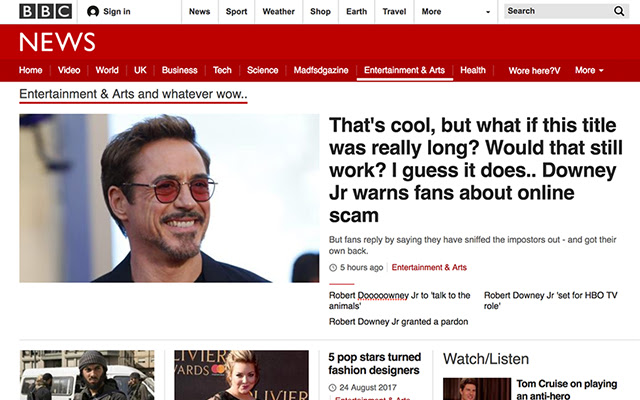
Скачать файл CRX расширения Design Mode
Скачайте файлы расширений Design Mode в формате crx, установите расширения Chrome вручную в браузере или поделитесь файлами crx с друзьями, чтобы легко установить расширения Chrome.
Инструкции по использованию расширения
                        Click the pen icon to change text in a website. Click again to turn it off :)

Try out new/alternative content by manipulating text directly in a website, without having to go through a build-tool or CMS. With Design Mode you can manipulate all text on a website including headers and links. A page refresh brings the old content right back.
Основная информация о расширении
| Название |  Design Mode Design Mode |
| ID | cfikhhompgapfkmjdhlofhjgkikcckac |
| Официальный URL | https://chrome.google.com/webstore/detail/design-mode/cfikhhompgapfkmjdhlofhjgkikcckac |
| Описание | Toggle the ability to temporarily edit content directly in a website. |
| Размер файла | 17.15 KB |
| Количество установок | 646 |
| Текущая Версия | 0.3 |
| Последнее Обновление | 2018-11-14 |
| Дата публикации | 2018-11-14 |
| Рейтинг | 5.00/5 Всего 8 оценок |
| Разработчик | madeco |
| Электронная почта | [email protected] |
| Тип оплаты | free |
| Поддерживаемые языки | en,nl |
| manifest.json | |
{
    "update_url": "https:\/\/clients2.google.com\/service\/update2\/crx",
    "name": "__MSG_extName__",
    "short_name": "__MSG_extName__",
    "description": "__MSG_extDescription__",
    "default_locale": "en",
    "version": "0.3",
    "permissions": [
        "activeTab",
        "tabs"
    ],
    "background": {
        "scripts": [
            "designmode.js"
        ],
        "persistent": false
    },
    "browser_action": {
        "default_title": "Toggle design mode",
        "default_icon": "design-mode.png"
    },
    "icons": {
        "48": "design-mode-active.png",
        "128": "design-mode128.png"
    },
    "manifest_version": 2
} | |