Gitlab CI Dashboard
Manage your Gitlab pipelines in 2 clicks!
Что такое Gitlab CI Dashboard?
Gitlab CI Dashboard - это расширение Chrome, разработанное https://pixel-perfect.dev, и его основная функция - "Manage your Gitlab pipelines in 2 clicks!".
Снимки экрана расширения
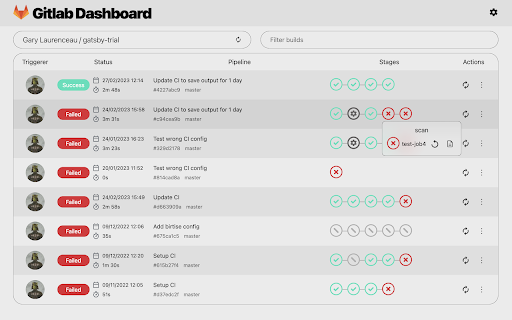
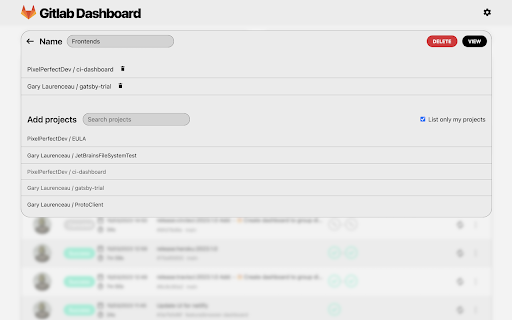
Скачать файл CRX расширения Gitlab CI Dashboard
Скачайте файлы расширений Gitlab CI Dashboard в формате crx, установите расширения Chrome вручную в браузере или поделитесь файлами crx с друзьями, чтобы легко установить расширения Chrome.
Инструкции по использованию расширения
                        Features:
- 🔐️ Use your Gitlab account from gitlab.com, self-hosted GitLab Community Edition (CE) or self-hosted GitLab Enterprise Edition (EE) server.
- 🔎 Search for your personal depots and public ones.
- 🖥 Keep track of pipelines and show jobs details.
- 🛠 Trigger, abort and retry pipeline or job.

Plugin is in beta, send your feedback here: https://tally.so/r/3jebP4

Also available on your JetBrains IDE with more features: https://plugins.jetbrains.com/plugin/15457-gitlab-ci-dashboard
Основная информация о расширении
| Название |  Gitlab CI Dashboard Gitlab CI Dashboard |
| ID | cmemccamcgimfmellbnblebeajdfjogl |
| Официальный URL | https://chromewebstore.google.com/detail/gitlab-ci-dashboard/cmemccamcgimfmellbnblebeajdfjogl |
| Описание | Manage your Gitlab pipelines in 2 clicks! |
| Размер файла | 1.27 MB |
| Количество установок | 87 |
| Текущая Версия | 2023.0.2 |
| Последнее Обновление | 2023-04-15 |
| Дата публикации | 2023-03-02 |
| Рейтинг | 3.00/5 Всего 2 оценок |
| Разработчик | https://pixel-perfect.dev |
| Электронная почта | [email protected] |
| Тип оплаты | in_app |
| Официальный сайт расширения | https://pixel-perfect.dev |
| URL страницы политики конфиденциальности | https://pixel-perfect.dev/privacy-policy.html |
| Поддерживаемые языки | en |
| manifest.json | |
{
    "update_url": "https:\/\/clients2.google.com\/service\/update2\/crx",
    "name": "Gitlab CI Dashboard",
    "version": "2023.0.2",
    "description": "Manage your Gitlab pipelines in 2 clicks!",
    "manifest_version": 3,
    "icons": {
        "16": "icons\/ic_plugin_gitlab_16.png",
        "48": "icons\/ic_plugin_gitlab_48.png",
        "128": "icons\/ic_plugin_gitlab_128.png"
    },
    "action": {
        "default_icon": "icons\/ic_plugin_gitlab_48.png",
        "default_popup": "index.html?popup=true",
        "default_title": "Gitlab Dashboard"
    },
    "browser_specific_settings": {
        "gecko": {
            "id": "[email protected]"
        }
    }
} | |