IPvBar
Display the server IP and country, with a realtime summary of IPv4, IPv6, and HTTPS information across all page elements.
Что такое IPvBar?
IPvBar - это расширение Chrome, разработанное TxThinking, и его основная функция - "Display the server IP and country, with a realtime summary of IPv4, IPv6, and HTTPS information across all page elements.".
Снимки экрана расширения
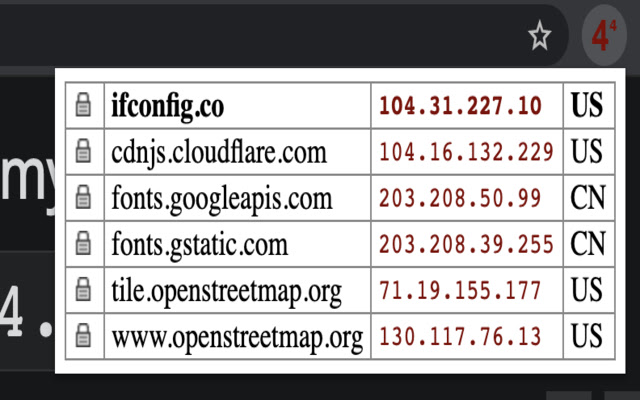
Скачать файл CRX расширения IPvBar
Скачайте файлы расширений IPvBar в формате crx, установите расширения Chrome вручную в браузере или поделитесь файлами crx с друзьями, чтобы легко установить расширения Chrome.
Инструкции по использованию расширения
When you install IPvBar, the IPvBar icon will appear on your chrome. When you are browsing the website, click on the IPvBar icon, and you will see the domain name list, IP list and IP corresponding country information of the current web page request. Основная информация о расширении
| Название |  IPvBar IPvBar |
| ID | copjmgogifdfjkaenpallapiidcpkjbm |
| Официальный URL | https://chrome.google.com/webstore/detail/ipvbar/copjmgogifdfjkaenpallapiidcpkjbm |
| Описание | Display the server IP and country, with a realtime summary of IPv4, IPv6, and HTTPS information across all page elements. |
| Размер файла | 3.03 MB |
| Количество установок | 82 |
| Текущая Версия | 2021.4.15 |
| Последнее Обновление | 2021-04-17 |
| Дата публикации | 2020-05-02 |
| Рейтинг | 3.67/5 Всего 3 оценок |
| Разработчик | TxThinking |
| Электронная почта | [email protected] |
| Тип оплаты | free |
| Официальный сайт расширения | https://github.com/txthinking/ipvbar |
| URL страницы помощи | https://github.com/txthinking/ipvbar |
| URL страницы политики конфиденциальности | https://www.txthinking.com/privacy.html |
| Поддерживаемые языки | en-US |
| manifest.json | |
{
"update_url": "https:\/\/clients2.google.com\/service\/update2\/crx",
"name": "IPvBar",
"manifest_version": 2,
"version": "2021.4.15",
"minimum_chrome_version": "26",
"description": "Display the server IP and country, with a realtime summary of IPv4, IPv6, and HTTPS information across all page elements.",
"homepage_url": "https:\/\/github.com\/txthinking\/ipvbar",
"icons": {
"16": "icon16.png",
"128": "icon128.png"
},
"background": {
"scripts": [
"common.js",
"wasm_exec.js",
"client.js",
"b.js",
"background.js"
]
},
"page_action": {
"dummy": "http:\/\/crbug.com\/86449"
},
"options_ui": {
"page": "options.html",
"chrome_style": true
},
"content_security_policy": "script-src 'self' 'unsafe-eval' 'wasm-eval'; object-src 'self'",
"permissions": [
"contextMenus",
"storage",
"tabs",
"webNavigation",
"webRequest",
" | |