Salesforce Show Api Name
Display Field & Object API Names on Detail Pages (LEX & Classic).
Что такое Salesforce Show Api Name?
Salesforce Show Api Name - это расширение Chrome, разработанное zcchen.dev, и его основная функция - "Display Field & Object API Names on Detail Pages (LEX & Classic).".
Снимки экрана расширения


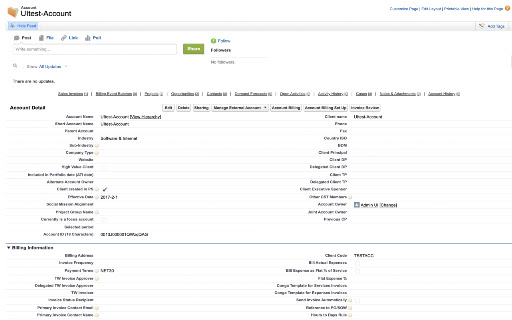
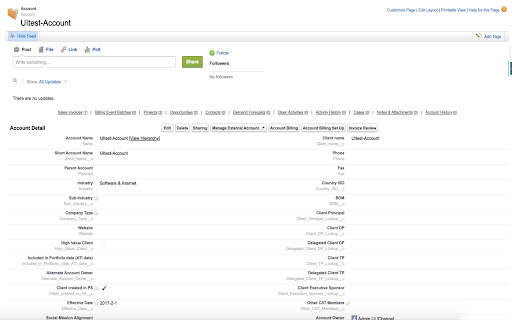
Скачать файл CRX расширения Salesforce Show Api Name
Скачайте файлы расширений Salesforce Show Api Name в формате crx, установите расширения Chrome вручную в браузере или поделитесь файлами crx с друзьями, чтобы легко установить расширения Chrome.
Инструкции по использованию расширения
                        This repo is a chrome extension to show field and object api name on record detail page.


How to use it:

In salesforce classic/lightning record detail page, click extension icon, you will see the field/object api name added to the page.


In addition to clicking the icon, shortcut is supported:

MacOs: control + command + Z
Windows: alt + shift + Z
Linux: alt + shift + Z
ChromeOs: alt + shift + Z

Extension repository: https://github.com/ChenZaichuang/salesforce_show_api_name

I appreciate to receive any feedbacks or pull requests, you can leave your comments in the repo or in the extension homepage or mail to [email protected] for any suggestions.
Основная информация о расширении
| Название |  Salesforce Show Api Name Salesforce Show Api Name |
| ID | dcfecmnffjopafbbbaepgopfcphnoham |
| Официальный URL | https://chromewebstore.google.com/detail/salesforce-show-api-name/dcfecmnffjopafbbbaepgopfcphnoham |
| Описание | Display Field & Object API Names on Detail Pages (LEX & Classic). |
| Размер файла | 13.77 KB |
| Количество установок | 47,429 |
| Текущая Версия | 1.2.1 |
| Последнее Обновление | 2021-03-28 |
| Дата публикации | 2019-12-25 |
| Рейтинг | 4.74/5 Всего 23 оценок |
| Разработчик | zcchen.dev |
| Электронная почта | [email protected] |
| Тип оплаты | free |
| Официальный сайт расширения | https://github.com/ChenZaichuang/salesforce_show_api_name |
| URL страницы помощи | https://github.com/ChenZaichuang/salesforce_show_api_name |
| Поддерживаемые языки | en-US |
| manifest.json | |
{
    "update_url": "https:\/\/clients2.google.com\/service\/update2\/crx",
    "name": "Salesforce Show Api Name",
    "version": "1.2.1",
    "manifest_version": 2,
    "description": "Display Field & Object API Names on Detail Pages (LEX & Classic).",
    "homepage_url": "https:\/\/github.com\/ChenZaichuang\/salesforce_show_api_name",
    "background": {
        "scripts": [
            "background.js"
        ]
    },
    "icons": {
        "16": "images\/16.png",
        "32": "images\/32.png",
        "48": "images\/48.png",
        "128": "images\/128.png"
    },
    "browser_action": {
        "default_icon": {
            "16": "images\/16.png",
            "32": "images\/32.png",
            "48": "images\/48.png",
            "128": "images\/128.png"
        },
        "default_title": "Show Salesforce Api Name"
    },
    "content_scripts": [
        {
            "matches": [
                "https:\/\/*.force.com\/*",
                "https:\/\/*.salesforce.com\/*"
            ],
            "js": [
                "content_script.js"
            ],
            "run_at": "document_end",
            "all_frames": false
        }
    ],
    "permissions": [
        "activeTab",
        "cookies",
        "https:\/\/*.force.com\/*",
        "https:\/\/*.salesforce.com\/*"
    ],
    "commands": {
        "showApiName": {
            "suggested_key": {
                "windows": "Alt+Shift+Z",
                "mac": "MacCtrl+Ctrl+Z",
                "linux": "Alt+Shift+Z",
                "chromeos": "Alt+Shift+Z"
            },
            "description": "Show Api Name"
        }
    }
} | |