upStart
Bookmark Organizer
Что такое upStart?
upStart - это расширение Chrome, разработанное Fábio Rodrigues, и его основная функция - "Bookmark Organizer".
Снимки экрана расширения
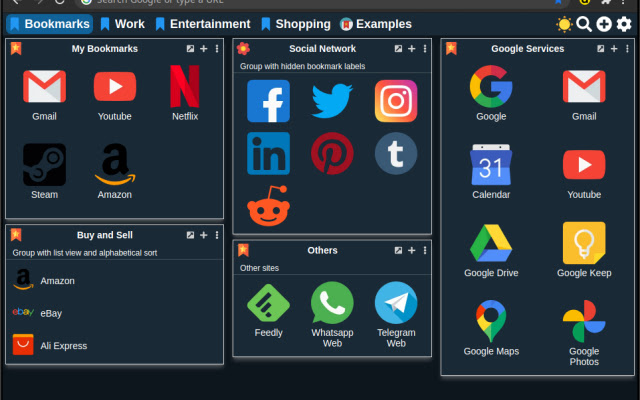


Скачать файл CRX расширения upStart
Скачайте файлы расширений upStart в формате crx, установите расширения Chrome вручную в браузере или поделитесь файлами crx с друзьями, чтобы легко установить расширения Chrome.
Инструкции по использованию расширения
                        upStart is a replacement of new tab page with quick access to your bookmarked pages.

Keep your bookmarks organized into groups and pages.

• Look & Fell highly customizable.

• Easily add bookmarks from any page or save all open tabs

• Intuitive and easy to customize

• Features like check for broken links and import bookmarks from the browser

• Synchronization with other devices through Dropbox

• Easily import and export your data

• Use your own icons and images

• Create restore points to revert changes

• Search bookmarks easily

• Themes

• Made with vanilla JS for better performance


Changelog:

Version 2.1
- Minor bugfixes


Version 2.0
- Application refactored from the ground with a lot of new features.
- Some of the older options will have to be replaced
- Complete new set of icons and Backgrounds
- Multiple language support. Right now we have only English and Portuguese
- Synchronization with Dropbox
- Sorry, but there are too many changes to list

Version 1.6.1
- Fix font color when group is colored

Version 1.6
- New experimental Dark mode
- You can now use "data:image" icons
- Convert any bookmark icon into "data:image"
- Option to convert all bookmarks into "data:image"
- Convert into "data:image" new bookmarks by default
- Minor bug fixes

Version 1.5.2
- fix the database update

Version 1.5.1
- Fix the "ERR_UNKNOWN_URL_SCHEME" error again :(

Version 1.5
- Removed most of confirmation dialogues for better usability
- Added tons of icons for groups and bookmarks
- Backgrounds added and some removed
- New icon for blank and undefined bookmarks
- New option to scan broken icons and replace by a nicer one
- New dialog to update the version
- User data now is separeted from the images data. The settings backup should be considerable smaller now
- Others minor bugs corrected

Version 1.4
- Just a minor update to fix the "ERR_UNKNOWN_URL_SCHEME" error on Chrome 71 and above

Version 1.3
- added the option to make groups color transparent
- added a global font color option
- upon adding a new bookmark from the menu it tries to fetch the built-in icon. If it fails it will try to use the favicon of the page.

Source code: github.com/anfabio/upstart
Основная информация о расширении
| Название |  upStart upStart |
| ID | ddalpldcidoajbgohbdlelfmfmjiccga |
| Официальный URL | https://chrome.google.com/webstore/detail/upstart/ddalpldcidoajbgohbdlelfmfmjiccga |
| Описание | Bookmark Organizer |
| Размер файла | 3.86 MB |
| Количество установок | 147 |
| Текущая Версия | 2.1 |
| Последнее Обновление | 2020-11-19 |
| Дата публикации | 2020-02-22 |
| Рейтинг | 5.00/5 Всего 2 оценок |
| Разработчик | Fábio Rodrigues |
| Электронная почта | [email protected] |
| Тип оплаты | free |
| Поддерживаемые языки | en |
| manifest.json | |
{
"update_url": "https:\/\/clients2.google.com\/service\/update2\/crx",
"manifest_version": 2,
"name": "upStart",
"short_name": "upStart",
"description": "Bookmark Organizer",
"version": "2.1",
"browser_action": {
"default_title": "upStart",
"default_icon": "img\/icon64.png",
"default_popup": "popup.html"
},
"icons": {
"16": "img\/icon16.png",
"48": "img\/icon48.png",
"128": "img\/icon128.png"
},
"content_security_policy": "script-src 'self'; object-src 'self'",
"web_accessible_resources": [
"js\/*.json",
"newtab.html"
],
"homepage_url": "https:\/\/github.com\/anfabio\/upstart",
"permissions": [
"file:\/\/\/*\/",
"tabs",
"management",
"alarms",
"storage",
"unlimitedStorage",
"contextMenus",
" | |