Clojure Extension
Adds an option to the context menu which allows you to eval selected Clojure code.
Что такое Clojure Extension?
Clojure Extension - это расширение Chrome, разработанное Big Solutions, и его основная функция - "Adds an option to the context menu which allows you to eval selected Clojure code.".
Снимки экрана расширения
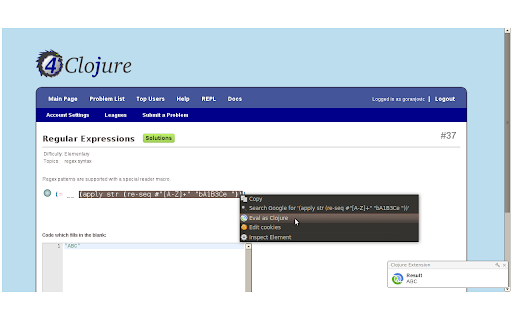
Скачать файл CRX расширения Clojure Extension
Скачайте файлы расширений Clojure Extension в формате crx, установите расширения Chrome вручную в браузере или поделитесь файлами crx с друзьями, чтобы легко установить расширения Chrome.
Инструкции по использованию расширения
                        Like Clojure and often read blogs about it? Often have to start up a REPL and copy&paste a snippet just to see how will it evaluate?

Worry no more! Install this Chrome extension and you will have another option in your browser's context menu - Eval as Clojure. Select a piece of Clojure code, right click it and choose this option and you will instantly get a notification with evaluation results.

Look at the screenshot to see how it works or install this extension and try it out yourself!

Change log:

Version 0.6 2012-01-08
-Added support for evaluation of multiple Clojure forms (including defs) in a single request.
-Added extension options page. Users can now choose between desktop notifications and plain old alerts.
Основная информация о расширении
| Название |  Clojure Extension Clojure Extension |
| ID | dkhaobmljgohccicjemmbacpooaacgeo |
| Официальный URL | https://chromewebstore.google.com/detail/clojure-extension/dkhaobmljgohccicjemmbacpooaacgeo |
| Описание | Adds an option to the context menu which allows you to eval selected Clojure code. |
| Размер файла | 118 KB |
| Количество установок | 122 |
| Текущая Версия | 0.8 |
| Последнее Обновление | 2016-11-21 |
| Дата публикации | 2016-11-19 |
| Рейтинг | 5.00/5 Всего 5 оценок |
| Разработчик | Big Solutions |
| Тип оплаты | free |
| Официальный сайт расширения | http://chromeclojure.com |
| URL страницы помощи | https://github.com/goranjovic/chromeclojure/issues |
| Поддерживаемые языки | en |
| manifest.json | |
{
    "update_url": "https:\/\/clients2.google.com\/service\/update2\/crx",
    "name": "Clojure Extension",
    "description": "Adds an option to the context menu which allows you to eval selected Clojure code.",
    "version": "0.8",
    "manifest_version": 2,
    "permissions": [
        "contextMenus",
        "notifications",
        "http:\/\/chromeclojure.com\/"
    ],
    "icons": {
        "16": "icon-tiny.png",
        "48": "icon-small.png",
        "128": "icon-large.png"
    },
    "background": {
        "scripts": [
            "jquery-3.1.1.min.js",
            "chromeclojure.js"
        ]
    },
    "options_page": "options.html",
    "content_security_policy": "default-src 'self'; style-src 'self'; connect-src http:\/\/chromeclojure.com\/; "
} | |