CloudyRoll
Managing your Crunchyroll queue has never been easier.
Что такое CloudyRoll?
CloudyRoll - это расширение Chrome, разработанное CloudMax, и его основная функция - "Managing your Crunchyroll queue has never been easier.".
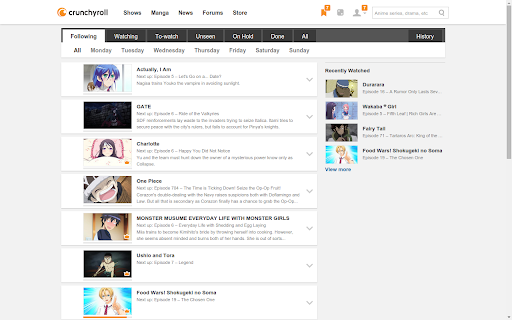
Снимки экрана расширения

Скачать файл CRX расширения CloudyRoll
Скачайте файлы расширений CloudyRoll в формате crx, установите расширения Chrome вручную в браузере или поделитесь файлами crx с друзьями, чтобы легко установить расширения Chrome.
Инструкции по использованию расширения
                        - Receive notifications when new episodes become available.
- Get a quick overview of which day all series air and schedule your week accordingly.
- Series are grouped depending on whether you're following a simulcast, watching ocassionally, put on hold, haven't began watching at all, or finished.
- Marking episodes as seen. Especially useful for minisodes where Crunchyroll or CloudyRoll may fail to properly mark an episode as seen.
- ... And much more!
Основная информация о расширении
| Название |  CloudyRoll CloudyRoll |
| ID | dlllcfhpddibpcimgobcchnaknpbalod |
| Официальный URL | https://chromewebstore.google.com/detail/cloudyroll/dlllcfhpddibpcimgobcchnaknpbalod |
| Описание | Managing your Crunchyroll queue has never been easier. |
| Размер файла | 548 KB |
| Количество установок | 150 |
| Текущая Версия | 1.2.3.94 |
| Последнее Обновление | 2016-06-27 |
| Дата публикации | 2016-06-27 |
| Рейтинг | 3.00/5 Всего 8 оценок |
| Разработчик | CloudMax |
| Тип оплаты | free |
| Официальный сайт расширения | http://cloudmodding.com/cloudyroll |
| Поддерживаемые языки | en |
| manifest.json | |
{
    "update_url": "https:\/\/clients2.google.com\/service\/update2\/crx",
    "author": "Max 'CloudMax' Persson",
    "name": "CloudyRoll",
    "short_name": "CloudyRoll",
    "version": "1.2.3.94",
    "description": "Managing your Crunchyroll queue has never been easier.",
    "omnibox": {
        "keyword": "cr"
    },
    "permissions": [
        "storage",
        "background",
        "cookies",
        "contextMenus",
        "notifications",
        "alarms",
        "*:\/\/*.crunchyroll.com\/*"
    ],
    "icons": {
        "16": "assets\/images\/cr.png",
        "48": "assets\/images\/cr.png",
        "128": "assets\/images\/cr.png"
    },
    "background": {
        "scripts": [
            "background\/background.js"
        ],
        "persistent": false
    },
    "browser_action": {
        "default_icon": "assets\/images\/cr.png",
        "default_popup": "popup\/popup.html"
    },
    "options_ui": {
        "page": "options\/options.html",
        "chrome_style": true
    },
    "content_scripts": [
        {
            "js": [
                "content\/content.js"
            ],
            "css": [
                "content\/content.css"
            ],
            "matches": [
                "*:\/\/*.crunchyroll.com\/*"
            ],
            "run_at": "document_end"
        },
        {
            "js": [
                "queue\/queue.js"
            ],
            "css": [
                "queue\/queue.css"
            ],
            "matches": [
                "*:\/\/*.crunchyroll.com\/home\/queue*"
            ],
            "run_at": "document_end"
        }
    ],
    "web_accessible_resources": [
        "content\/content.js.map",
        "queue\/queue.js.map"
    ],
    "manifest_version": 2
} | |