Steam Activity Filter
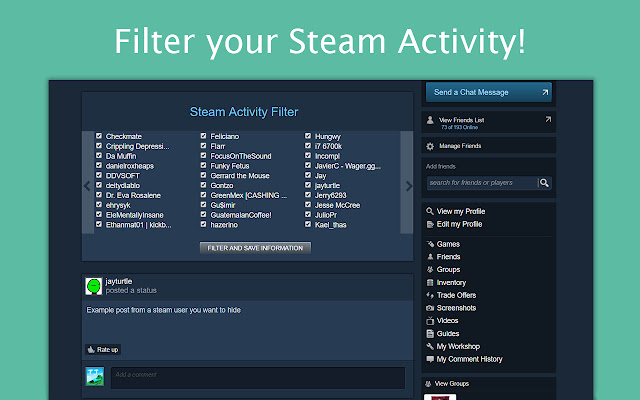
Steam Activity Filter lets you filter out unwanted screenshots and status updates from your Steam Friend Activity Feed.
Что такое Steam Activity Filter?
Steam Activity Filter - это расширение Chrome, разработанное jayleenli, и его основная функция - "Steam Activity Filter lets you filter out unwanted screenshots and status updates from your Steam Friend Activity Feed.".
Снимки экрана расширения

Скачать файл CRX расширения Steam Activity Filter
Скачайте файлы расширений Steam Activity Filter в формате crx, установите расширения Chrome вручную в браузере или поделитесь файлами crx с друзьями, чтобы легко установить расширения Chrome.
Инструкции по использованию расширения
                        Steam Activity Filter(SAF) hides unwanted posts on your Steam Activity Feed. (e.g. https://steamcommunity.com/my/home)

SAF automatically places a filtering interface on at the top your Steam Friend Activity Home page. SAF retrieves your current Steam Friends list (https://steamcommunity.com/my/friends) and places the usernames in the interface.

This Chrome Extension can hide the following types of posts:
-Screenshots
-New Games
-Status Posts
-Favorites on Steam Community items

How to use Steam Activity Filter:
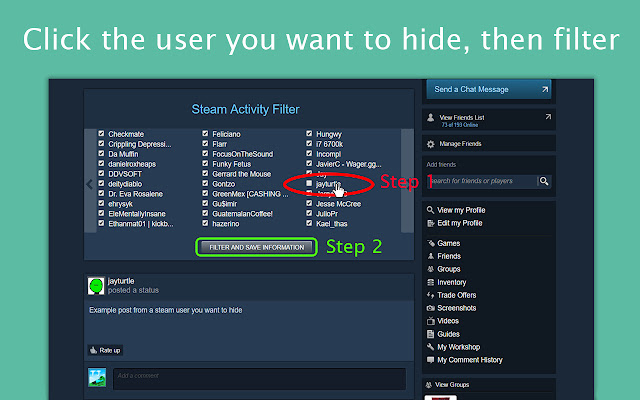
1. Uncheck the usernames of whom you do not want to see in your feed. Checked users will appear in your feed.
2. Click the filter button, and your Steam Activity Feed will change instantly.

Changelog:
https://github.com/jayleenli/Steam-Activity-Filter

Author:
Jayleen Li
Основная информация о расширении
| Название |  Steam Activity Filter Steam Activity Filter |
| ID | dnhaemngbanccjamofoeokgpadfegjcf |
| Официальный URL | https://chrome.google.com/webstore/detail/steam-activity-filter/dnhaemngbanccjamofoeokgpadfegjcf |
| Описание | Steam Activity Filter lets you filter out unwanted screenshots and status updates from your Steam Friend Activity Feed. |
| Размер файла | 40.39 KB |
| Количество установок | 71 |
| Текущая Версия | 1.1 |
| Последнее Обновление | 2017-04-03 |
| Дата публикации | 2017-04-03 |
| Рейтинг | 3.00/5 Всего 6 оценок |
| Разработчик | jayleenli |
| Тип оплаты | free |
| URL страницы политики конфиденциальности | https://docs.google.com/document/d/1Qs86rceXys_oTsdKI79pKmd7tKlf6bVusTb4PYokVIo/edit?usp=sharing |
| Поддерживаемые языки | en |
| manifest.json | |
{
    "update_url": "https:\/\/clients2.google.com\/service\/update2\/crx",
    "manifest_version": 2,
    "name": "Steam Activity Filter",
    "description": "Steam Activity Filter lets you filter out unwanted screenshots and status updates from your Steam Friend Activity Feed.",
    "version": "1.1",
    "icons": {
        "16": "saflogo.png",
        "48": "saflogo.png",
        "128": "saflogo.png"
    },
    "browser_action": {
        "default_icon": "saflogo.png"
    },
    "permissions": [
        "http:\/\/steamcommunity.com\/*"
    ],
    "content_scripts": [
        {
            "matches": [
                "http:\/\/steamcommunity.com\/id\/*",
                "http:\/\/steamcommunity.com\/profiles\/*"
            ],
            "exclude_matches": [
                "*:\/\/store.steampowered.com\/dynamicstore\/*",
                "*:\/\/store.steampowered.com\/checkout\/*",
                "*:\/\/store.steampowered.com\/widget\/*",
                "*:\/\/store.steampowered.com\/login\/*",
                "*:\/\/store.steampowered.com\/join\/*",
                "*:\/\/store.steampowered.com\/api\/*",
                "*:\/\/steamcommunity.com\/login\/*"
            ],
            "js": [
                "jQuery.min.js",
                "steamfilter.js"
            ]
        }
    ]
} | |