Grade Calculator for Blackboard Learn
Find out what your grade would be with certain assignments added.
Что такое Grade Calculator for Blackboard Learn?
Grade Calculator for Blackboard Learn - это расширение Chrome, разработанное Rohan Mathur, и его основная функция - "Find out what your grade would be with certain assignments added.".
Снимки экрана расширения

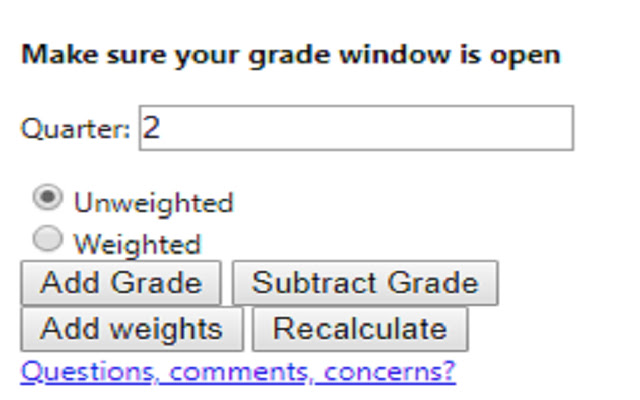
Скачать файл CRX расширения Grade Calculator for Blackboard Learn
Скачайте файлы расширений Grade Calculator for Blackboard Learn в формате crx, установите расширения Chrome вручную в браузере или поделитесь файлами crx с друзьями, чтобы легко установить расширения Chrome.
Инструкции по использованию расширения
                        **MAJOR UPDATE**
I MADE AN ACTUAL GUI!! This is now an actually usable chrome extension and something I'm actually kind of proud of. I hope everyone finds it useful!

Thanks,
Rohan

This extension is meant to help you figure out what your total grade would be after an assignment is entered into the grade book.

Feedback Form:
https://goo.gl/forms/1fpCghIIhv49VfTr1
Основная информация о расширении
| Название |  Grade Calculator for Blackboard Learn Grade Calculator for Blackboard Learn |
| ID | eohcolhmjdncdmicjibnnjfocokolonj |
| Официальный URL | https://chrome.google.com/webstore/detail/grade-calculator-for-blac/eohcolhmjdncdmicjibnnjfocokolonj |
| Описание | Find out what your grade would be with certain assignments added. |
| Размер файла | 71.73 KB |
| Количество установок | 435 |
| Текущая Версия | 4.0.0 |
| Последнее Обновление | 2019-11-25 |
| Дата публикации | 2019-11-21 |
| Рейтинг | 5.00/5 Всего 3 оценок |
| Разработчик | Rohan Mathur |
| Тип оплаты | free |
| URL страницы помощи | https://goo.gl/forms/1fpCghIIhv49VfTr1 |
| Поддерживаемые языки | en |
| manifest.json | |
{
    "update_url": "https:\/\/clients2.google.com\/service\/update2\/crx",
    "name": "Grade Calculator for Blackboard Learn",
    "version": "4.0.0",
    "manifest_version": 2,
    "description": "Find out what your grade would be with certain assignments added.",
    "browser_action": {
        "default_icon": "icon.png",
        "default_popup": "index.html"
    },
    "icons": {
        "16": "icon.png",
        "48": "icon.png",
        "128": "icon.png"
    },
    "permissions": [
        "tabs",
        "activeTab"
    ]
} | |