Dank Neon DevTools Theme
A danker, more neon theme.
Что такое Dank Neon DevTools Theme?
Dank Neon DevTools Theme - это расширение Chrome, разработанное Conlin Durbin, и его основная функция - "A danker, more neon theme.".
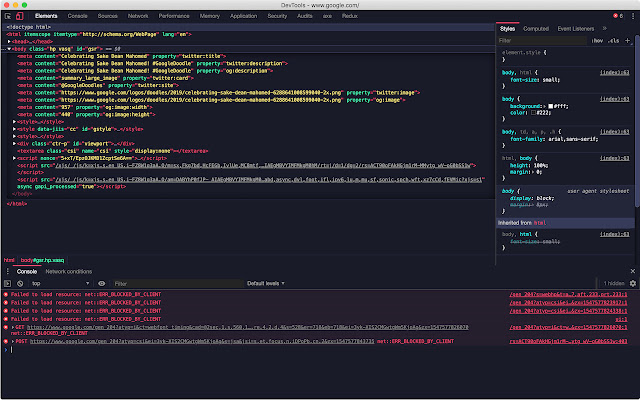
Снимки экрана расширения
Скачать файл CRX расширения Dank Neon DevTools Theme
Скачайте файлы расширений Dank Neon DevTools Theme в формате crx, установите расширения Chrome вручную в браузере или поделитесь файлами crx с друзьями, чтобы легко установить расширения Chrome.
Инструкции по использованию расширения
                        Dank Neon for the Chrome DevTools is a nice looking dark theme for your DevTools.

How to install
---------------------------------------------------------
- First install this theme
- Goto chrome://flags/#enable-devtools-experiments and Enable Developer Tools experiments. Select "Relaunch Now" at the bottom of the page.
- Open developer tools settings, select Experiments tab, and check 'Allow custom UI themes'.
- Reload devtools.
Основная информация о расширении
| Название |  Dank Neon DevTools Theme Dank Neon DevTools Theme |
| ID | eoijelgagfengjmfdjpoeooogcjgdobf |
| Официальный URL | https://chrome.google.com/webstore/detail/dank-neon-devtools-theme/eoijelgagfengjmfdjpoeooogcjgdobf |
| Описание | A danker, more neon theme. |
| Размер файла | 34.56 KB |
| Количество установок | 164 |
| Текущая Версия | 2.1 |
| Последнее Обновление | 2019-01-15 |
| Дата публикации | 2019-01-15 |
| Рейтинг | 5.00/5 Всего 2 оценок |
| Разработчик | Conlin Durbin |
| Тип оплаты | free |
| Официальный сайт расширения | https://github.com/DankNeon/chrome-devtools |
| URL страницы помощи | https://github.com/DankNeon/chrome-devtools/issues |
| Поддерживаемые языки | en |
| manifest.json | |
{
    "update_url": "https:\/\/clients2.google.com\/service\/update2\/crx",
    "name": "Dank Neon DevTools Theme",
    "short_name": "A danker, more neon theme for Chrome Devtools",
    "version": "2.1",
    "description": "A danker, more neon theme.",
    "devtools_page": "devtools.html",
    "manifest_version": 2,
    "content_security_policy": "script-src 'self' https:\/\/www.google-analytics.com; object-src 'self'",
    "icons": {
        "16": "images\/icon16.png",
        "48": "images\/icon48.png",
        "128": "images\/icon128.png"
    }
} | |