One Click Downloader
Automatically save downloaded files to different folders based on their type or name.
Что такое One Click Downloader?
One Click Downloader - это расширение Chrome, разработанное Till Haldimann, и его основная функция - "Automatically save downloaded files to different folders based on their type or name.".
Снимки экрана расширения


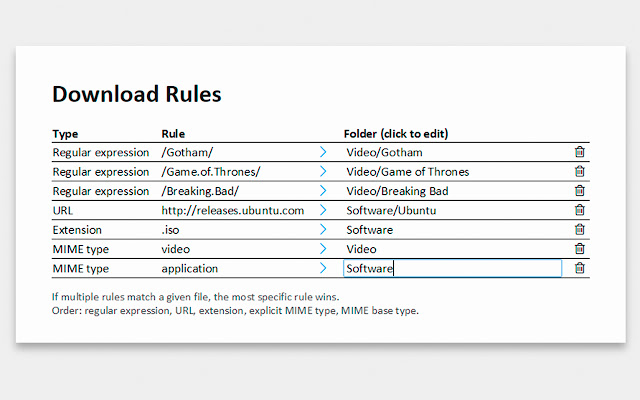
Скачать файл CRX расширения One Click Downloader
Скачайте файлы расширений One Click Downloader в формате crx, установите расширения Chrome вручную в браузере или поделитесь файлами crx с друзьями, чтобы легко установить расширения Chrome.
Инструкции по использованию расширения
                        HOW DOES IT WORK?

Right-click on a download link and choose "Set download folder..." from the context menu.
Create a rule for the file, saying in which folder this file and similar ones should be saved.

From now on, you can start downloads with a simple click and the files will end up in the right place.

Files can be identified by their MIME type, file extension, name or URL.
Основная информация о расширении
| Название |  One Click Downloader One Click Downloader |
| ID | fbhngehflnenfeefgjfkflhbjaaffgkd |
| Официальный URL | https://chrome.google.com/webstore/detail/one-click-downloader/fbhngehflnenfeefgjfkflhbjaaffgkd |
| Описание | Automatically save downloaded files to different folders based on their type or name. |
| Размер файла | 71.85 KB |
| Количество установок | 2,875 |
| Текущая Версия | 1.2.3 |
| Последнее Обновление | 2015-03-29 |
| Дата публикации | 2015-03-29 |
| Рейтинг | 3.00/5 Всего 15 оценок |
| Разработчик | Till Haldimann |
| Тип оплаты | free |
| Поддерживаемые языки | de,en |
| manifest.json | |
{
    "update_url": "https:\/\/clients2.google.com\/service\/update2\/crx",
    "manifest_version": 2,
    "default_locale": "en",
    "name": "__MSG_appName__",
    "short_name": "__MSG_appName__",
    "description": "__MSG_appDescription__",
    "version": "1.2.3",
    "author": "Till Haldimann",
    "icons": {
        "128": "graphics\/128.png",
        "48": "graphics\/48.png",
        "16": "graphics\/16.png"
    },
    "permissions": [
        "downloads",
        "contextMenus",
        "tabs",
        "storage"
    ],
    "content_security_policy": "script-src 'self' 'unsafe-eval'; object-src 'self'",
    "background": {
        "scripts": [
            "scripts\/event.js"
        ],
        "persistent": false
    },
    "options_page": "pages\/options.html"
} | |