Forest HD Wallpapers New Tab Green Theme
Every time you open a new tab, you will get different HD wallpapers in the forest. This new theme includes clock and more.
Что такое Forest HD Wallpapers New Tab Green Theme?
Forest HD Wallpapers New Tab Green Theme - это расширение Chrome, разработанное http://mytab.me, и его основная функция - "Every time you open a new tab, you will get different HD wallpapers in the forest. This new theme includes clock and more.".
Снимки экрана расширения
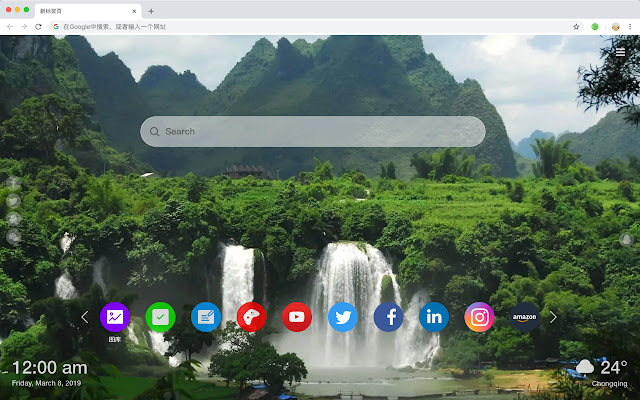


Скачать файл CRX расширения Forest HD Wallpapers New Tab Green Theme
Скачайте файлы расширений Forest HD Wallpapers New Tab Green Theme в формате crx, установите расширения Chrome вручную в браузере или поделитесь файлами crx с друзьями, чтобы легко установить расширения Chrome.
Инструкции по использованию расширения
                        Here's a list of other features you'll get:
 - To-do list
 - Set your favorite wallpapers
 - Discover new hot spots
 - Bookmarks
 - Social network notifications
 - High quality wallpaper for each new label
 - Clock showing date and time
 - Weather widget
 - Open to search
Основная информация о расширении
| Название |  Forest HD Wallpapers New Tab Green Theme Forest HD Wallpapers New Tab Green Theme |
| ID | fgkainhljcgakkbemoddjeiodkhjdmkg |
| Официальный URL | https://chrome.google.com/webstore/detail/forest-hd-wallpapers-new/fgkainhljcgakkbemoddjeiodkhjdmkg |
| Описание | Every time you open a new tab, you will get different HD wallpapers in the forest. This new theme includes clock and more. |
| Размер файла | 58.16 KB |
| Количество установок | 41 |
| Текущая Версия | 1.1.1.0 |
| Последнее Обновление | 2019-06-24 |
| Дата публикации | 2019-06-24 |
| Разработчик | http://mytab.me |
| Тип оплаты | free |
| Поддерживаемые языки | en,zh-CN,zh-TW |
| manifest.json | |
{
    "name": "__MSG_ext_name__",
    "manifest_version": 2,
    "description": "__MSG_ext_desc__",
    "browser_action": {
        "default_icon": {
            "48": "icons\/48.png"
        },
        "default_title": "__MSG_ext_name__"
    },
    "chrome_url_overrides": {
        "newtab": "pages\/newtab\/index.html"
    },
    "background": {
        "scripts": [
            "app.js",
            "pages\/background\/index.js"
        ],
        "persistent": false
    },
    "default_locale": "en",
    "icons": {
        "48": "icons\/48.png",
        "128": "icons\/128.png"
    },
    "minimum_chrome_version": "57",
    "offline_enabled": true,
    "update_url": "https:\/\/clients2.google.com\/service\/update2\/crx",
    "version": "1.1.1.0"
} | |