ClickHint
Better browsing - Inteligent alternative to bookmark tools & history
Что такое ClickHint?
ClickHint - это расширение Chrome, разработанное http://www.clickhint.com, и его основная функция - "Better browsing - Inteligent alternative to bookmark tools & history".
Снимки экрана расширения
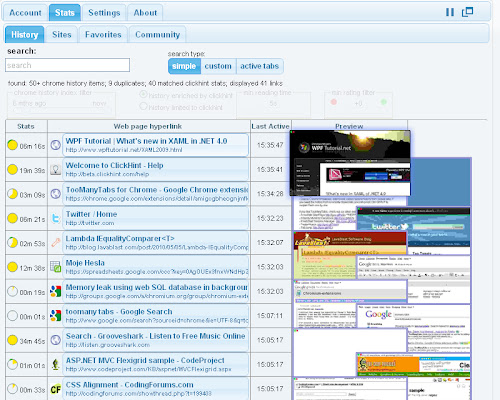


Скачать файл CRX расширения ClickHint
Скачайте файлы расширений ClickHint в формате crx, установите расширения Chrome вручную в браузере или поделитесь файлами crx с друзьями, чтобы легко установить расширения Chrome.
Инструкции по использованию расширения
                        ClickHint can help you browse and research the internet.

It is first extension supporting full text search on active tabs or your favourites.

Main features:
- full text search:
     - active tabs
     - your recent history
     - bookmarked pages - synchronized across different desktops

- enriched search results with your past browsing statistics
- enriched search results with community statistics
- and more


It was never easier to find what you have read in a past, was it 5 minutes ago or months ago. It is a tab manager, history and bookmarks tool all in one.

ClickHint can make any research easier and faster with features such as search hints helping you decide where to click next, or the innovative browser history search engine. It is non-intrusive extension synced across different desktops with high adding value. It helps to replicate and speed up your personal pattern of exploring and benefiting from internet resources.

For more help go to http://www.clickhint.com

Release notes:
0.9.7.1
 - upgraded manifest to 2.0
0.8.4.11
 - full text search on bookmarked pages
0.8.4.10
 - added active tabs with full text search
0.8.4.7
 - added preview
0.8.4.6
 - added pause action
0.8.4.5
 - enabled keyboard shortcuts
 - fix for google experimental search preview
Основная информация о расширении
| Название |  ClickHint ClickHint |
| ID | fjlfhmodommidkcahnnjohgpnkemocna |
| Официальный URL | https://chrome.google.com/webstore/detail/clickhint/fjlfhmodommidkcahnnjohgpnkemocna |
| Описание | Better browsing - Inteligent alternative to bookmark tools & history |
| Размер файла | 481 KB |
| Количество установок | 54 |
| Текущая Версия | 0.9.7.1 |
| Последнее Обновление | 2013-06-27 |
| Дата публикации | 2013-06-27 |
| Рейтинг | 4.07/5 Всего 44 оценок |
| Разработчик | http://www.clickhint.com |
| Тип оплаты | free |
| Поддерживаемые языки | en |
| manifest.json | |
{
    "update_url": "https:\/\/clients2.google.com\/service\/update2\/crx",
    "manifest_version": 2,
    "name": "ClickHint",
    "version": "0.9.7.1",
    "description": "Better browsing - Inteligent alternative to bookmark tools & history",
    "background": {
        "page": "background.html"
    },
    "options_page": "popup.html",
    "web_accessible_resources": [
        "images\/greenScore.png",
        "images\/redScore.png",
        "images\/delete.png",
        "images\/stop.png",
        "images\/hideAll.png",
        "images\/redScore.png"
    ],
    "permissions": [
        "tabs",
        "history",
        "bookmarks",
        "notifications",
        "http:\/\/*\/*",
        "https:\/\/*\/*",
        "unlimitedStorage"
    ],
    "browser_action": {
        "default_icon": "images\/icon.png",
        "default_title": "ClickHint",
        "default_popup": "popup.html"
    },
    "icons": {
        "16": "images\/icon16.png",
        "48": "images\/icon48.png",
        "128": "images\/icon128.png"
    },
    "content_scripts": [
        {
            "matches": [
                "http:\/\/*\/*",
                "https:\/\/*\/*",
                "http:\/\/localhost\/"
            ],
            "css": [
                "css\/content.css",
                "css\/shared.css"
            ],
            "js": [
                "scripts\/jquery-1.8.3.js",
                "scripts\/md5.js",
                "content.min.js"
            ],
            "run_at": "document_idle",
            "all_frames": false
        }
    ],
    "content_security_policy": "script-src 'self' https:\/\/ssl.google-analytics.com; object-src 'self'"
} | |