YouTube video timestamps
Displays YouTube video timecodes from descriptions and comments.
Что такое YouTube video timestamps?
YouTube video timestamps - это расширение Chrome, разработанное Roman Sadovnikov, и его основная функция - "Displays YouTube video timecodes from descriptions and comments.".
Снимки экрана расширения
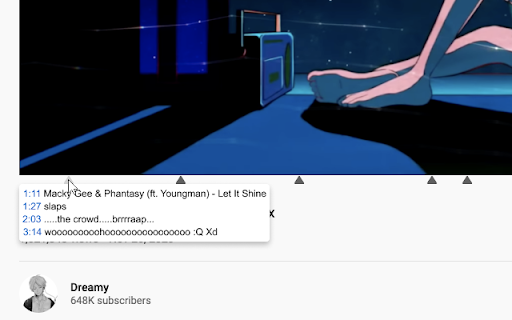
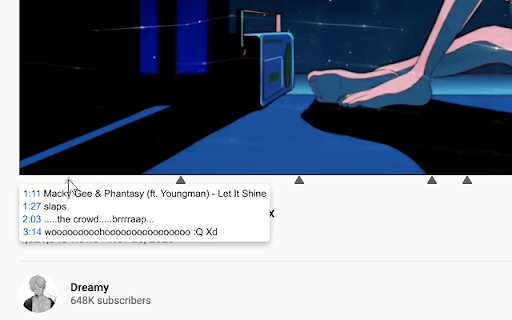
Скачать файл CRX расширения YouTube video timestamps
Скачайте файлы расширений YouTube video timestamps в формате crx, установите расширения Chrome вручную в браузере или поделитесь файлами crx с друзьями, чтобы легко установить расширения Chrome.
Инструкции по использованию расширения
                        If there are timecodes in the description or comments to a YouTube video, the extension catches them and displays them under the video.

So far, the extension only shows the timecodes that you have opened on your computer.
Основная информация о расширении
| Название |  YouTube video timestamps YouTube video timestamps |
| ID | fkcajpjelgilnhhadfpchooafgdjacpn |
| Официальный URL | https://chromewebstore.google.com/detail/youtube-video-timestamps/fkcajpjelgilnhhadfpchooafgdjacpn |
| Описание | Displays YouTube video timecodes from descriptions and comments. |
| Размер файла | 25.97 KB |
| Количество установок | 20 |
| Текущая Версия | 1.0 |
| Последнее Обновление | 2021-04-12 |
| Дата публикации | 2021-04-12 |
| Разработчик | Roman Sadovnikov |
| Электронная почта | [email protected] |
| Тип оплаты | free |
| Поддерживаемые языки | id,ms,de,en,en-GB,en-US,fil,fr,sw,nl,no,vi,tr,ca,da,et,es,hr,hu,pl,sk,sl,fi,sv,cs,el,sr,bg,iw,fa,mr,hi,bn,gu,ta,te,ml,th,am-ET,ar |
| manifest.json | |
{
    "update_url": "https:\/\/clients2.google.com\/service\/update2\/crx",
    "icons": {
        "128": "\/icon.png"
    },
    "manifest_version": 2,
    "background": {
        "scripts": [
            "\/js\/chrome.js"
        ]
    },
    "permissions": [
        "https:\/\/*.youtube.com\/*"
    ],
    "name": "YouTube video timestamps",
    "default_locale": "en",
    "description": "Displays YouTube video timecodes from descriptions and comments.",
    "browser_action": {
        "default_icon": "\/icon.png",
        "default_popup": "\/options.html"
    },
    "content_scripts": [
        {
            "all_frames": true,
            "css": [
                "\/styles\/page_styles.css"
            ],
            "js": [
                "\/js\/content.js"
            ],
            "matches": [
                "https:\/\/*.youtube.com\/*"
            ]
        }
    ],
    "web_accessible_resources": [
        "styles\/*.css",
        "*.js"
    ],
    "version": "1.0"
} | |