Zamify
Zamify allows you to play your Shazams in Spotify, directly from the browser.
Что такое Zamify?
Zamify - это расширение Chrome, разработанное http://sirlisko.com, и его основная функция - "Zamify allows you to play your Shazams in Spotify, directly from the browser.".
Снимки экрана расширения
Скачать файл CRX расширения Zamify
Скачайте файлы расширений Zamify в формате crx, установите расширения Chrome вручную в браузере или поделитесь файлами crx с друзьями, чтобы легко установить расширения Chrome.
Инструкции по использованию расширения
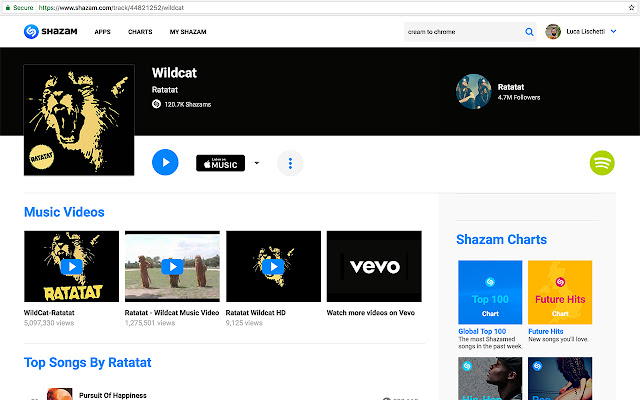
                        Zamify adds a small Spotify™ icon to every Shazam™ track page and allows you to play that track directly in Spotify™.

Zamify is not affiliated with Shazam Entertainment Limited.
"Shazam" and its logo are trademarks and registered trademarks of Shazam Entertainment Limited.
All other companies and product names are trademarks or registered trademarks of their respective companies.
Основная информация о расширении
| Название |  Zamify Zamify |
| ID | foilfgbdcipbajipeodmjjnkflkfocin |
| Официальный URL | https://chrome.google.com/webstore/detail/zamify/foilfgbdcipbajipeodmjjnkflkfocin |
| Описание | Zamify allows you to play your Shazams in Spotify, directly from the browser. |
| Размер файла | 15.35 KB |
| Количество установок | 101 |
| Текущая Версия | 1.0.2 |
| Последнее Обновление | 2020-06-30 |
| Дата публикации | 2020-06-30 |
| Рейтинг | 2.78/5 Всего 9 оценок |
| Разработчик | http://sirlisko.com |
| Электронная почта | [email protected] |
| Тип оплаты | free |
| Официальный сайт расширения | https://sirlisko.com/blog/shazamify |
| URL страницы помощи | https://github.com/sirLisko/shazamify |
| Поддерживаемые языки | en |
| manifest.json | |
{
    "update_url": "https:\/\/clients2.google.com\/service\/update2\/crx",
    "name": "Zamify",
    "version": "1.0.2",
    "description": "Zamify allows you to play your Shazams in Spotify, directly from the browser.",
    "manifest_version": 2,
    "web_accessible_resources": [
        "\/oauth2\/*"
    ],
    "permissions": [
        "identity",
        "storage"
    ],
    "content_scripts": [
        {
            "matches": [
                "https:\/\/www.shazam.com\/*track\/*"
            ],
            "css": [
                "style.css"
            ],
            "js": [
                "base.js"
            ]
        }
    ],
    "background": {
        "scripts": [
            "eventPage.js"
        ],
        "persistent": false
    },
    "icons": {
        "16": "icons\/icon16.png",
        "48": "icons\/icon48.png",
        "128": "icons\/icon128.png"
    }
} | |