Speed Dial 3™
Speed Dial 3™ offers speed dial, and quick access to your APPS, bookmarks and history.
Что такое Speed Dial 3™?
Speed Dial 3™ - это расширение Chrome, разработанное SD3™, и его основная функция - "Speed Dial 3™ offers speed dial, and quick access to your APPS, bookmarks and history.".
Снимки экрана расширения
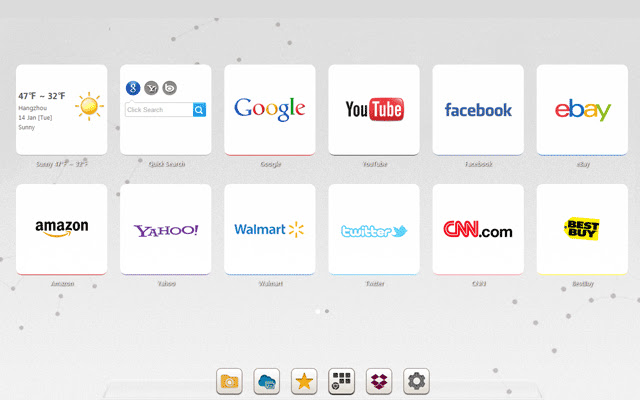

Скачать файл CRX расширения Speed Dial 3™
Скачайте файлы расширений Speed Dial 3™ в формате crx, установите расширения Chrome вручную в браузере или поделитесь файлами crx с друзьями, чтобы легко установить расширения Chrome.
Инструкции по использованию расширения
                        Speed Dial 3™ is an extended application of the Chrome browser which is based on HTML5. It replaces original New tab page. Save your favorite pages in one place with quick access to apps, bookmarks and browsing history.

It provides several features such as custom speed dial(like  count,style,size,opacity,etc), custom themes and background, quick add your common sites and apps, weather, quick search and auto backup data in time.

==============================
Update Log:

Version: 1.7.9 Updated: 2014-12-11
1. Fixed some bugs.

Version: 1.7.8 Updated: 2014-11-20
1. Added Super Discount function (only for chinese language)
2. Fixed some bugs.
Основная информация о расширении
| Название |  Speed Dial 3™ Speed Dial 3™ |
| ID | hfgjjcbbihjnpdommbepdkpfnkkapnbh |
| Официальный URL | https://chrome.google.com/webstore/detail/speed-dial-3/hfgjjcbbihjnpdommbepdkpfnkkapnbh |
| Описание | Speed Dial 3™ offers speed dial, and quick access to your APPS, bookmarks and history. |
| Размер файла | 294 KB |
| Количество установок | 40,000 |
| Текущая Версия | 1.7.9 |
| Последнее Обновление | 2014-12-10 |
| Дата публикации | 2014-12-10 |
| Рейтинг | 3.53/5 Всего 637 оценок |
| Разработчик | SD3™ |
| Тип оплаты | free |
| Поддерживаемые языки | de,en,fr,es,es-419,pt-BR,pt-PT,ru,zh-CN,zh-TW,ja |
| manifest.json | |
{
    "background": {
        "scripts": [
            "js\/background.js"
        ]
    },
    "name": "__MSG_chrome_extension_name__",
    "short_name": "__MSG_chrome_extension_short_name__",
    "description": "__MSG_chrome_extension_description__",
    "version": "1.7.9",
    "browser_action": {
        "default_icon": "img\/icon_16.png",
        "default_popup": "pop.html"
    },
    "icons": {
        "16": "img\/icon_16.png",
        "128": "img\/icon_128.png"
    },
    "chrome_url_overrides": {
        "newtab": "index.html"
    },
    "update_url": "http:\/\/clients2.google.com\/service\/update2\/crx",
    "default_locale": "en",
    "options_page": "index.html#setting",
    "permissions": [
        "management",
        "history",
        "chrome:\/\/favicon\/",
        "bookmarks",
        "tabs",
        "http:\/\/*\/*",
        "https:\/\/*\/*",
        "contextMenus",
        "notifications",
        "topSites",
        "unlimitedStorage"
    ],
    "web_accessible_resources": [
        "background.html",
        "pop.html",
        "redirect.html",
        "index.html"
    ],
    "content_security_policy": "script-src 'self'; object-src 'self';",
    "manifest_version": 2
} | |


![Speed Dial [FVD] - New Tab Page, 3D, Sync...](https://lh3.googleusercontent.com/w3K2CDl4n-0LZVksR5dwGR4Su5USBhNXQQc1-1isyFxaaGGsja7_8_NntP_Gy5bu6gzLS3Kv0pHRM13ZmohkLTAOn4w)