Mturk BBox Counter(Auto)
This extension will count all the BBoxes you have made in mturk work, just click on 'Count BBoxes' it will show the count.
Что такое Mturk BBox Counter(Auto)?
Mturk BBox Counter(Auto) - это расширение Chrome, разработанное kujilab, и его основная функция - "This extension will count all the BBoxes you have made in mturk work, just click on 'Count BBoxes' it will show the count.".
Снимки экрана расширения

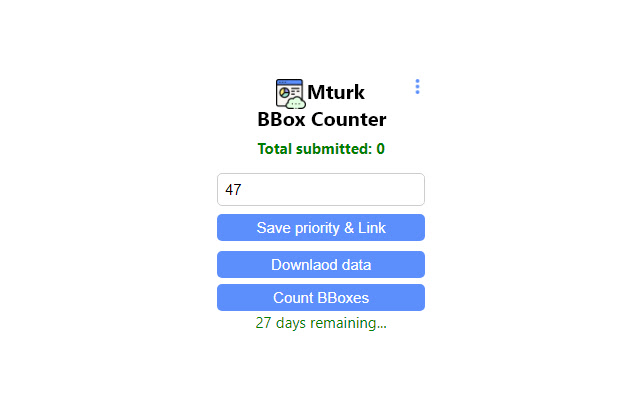
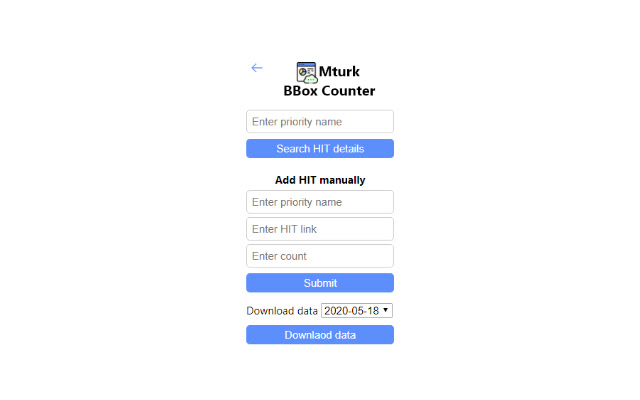
Скачать файл CRX расширения Mturk BBox Counter(Auto)
Скачайте файлы расширений Mturk BBox Counter(Auto) в формате crx, установите расширения Chrome вручную в браузере или поделитесь файлами crx с друзьями, чтобы легко установить расширения Chrome.
Инструкции по использованию расширения
                        Features:
* Count word BBoxes
* Store and retrieve you worked data in .csv format
* Get details by priority name
* Text auto suggestion in Transcription work
Основная информация о расширении
| Название |  Mturk BBox Counter(Auto) Mturk BBox Counter(Auto) |
| ID | hnmpipiodnmlnljledjkgdlbgheibcde |
| Официальный URL | https://chrome.google.com/webstore/detail/mturk-bbox-counterauto/hnmpipiodnmlnljledjkgdlbgheibcde |
| Описание | This extension will count all the BBoxes you have made in mturk work, just click on 'Count BBoxes' it will show the count. |
| Размер файла | 76.83 KB |
| Количество установок | 11 |
| Текущая Версия | 3.8.7 |
| Последнее Обновление | 2020-07-20 |
| Дата публикации | 2020-07-01 |
| Разработчик | kujilab |
| Электронная почта | [email protected] |
| Тип оплаты | free |
| Поддерживаемые языки | en |
| manifest.json | |
{
    "update_url": "https:\/\/clients2.google.com\/service\/update2\/crx",
    "name": "Mturk BBox Counter(Auto)",
    "description": "This extension will count all the BBoxes you have made in mturk work, just click on 'Count BBoxes' it will show the count.",
    "version": "3.8.7",
    "manifest_version": 2,
    "content_scripts": [
        {
            "matches": [
                "https:\/\/worker.mturk.com\/*"
            ],
            "js": [
                "js\/content.js"
            ]
        }
    ],
    "icons": {
        "16": "images\/16.png",
        "48": "images\/48.png",
        "128": "images\/128.png"
    },
    "browser_action": {
        "default_icon": "images\/32.png",
        "default_popup": "popup.html",
        "default_title": "Mturk BBox Counter"
    },
    "permissions": [
        "https:\/\/worker.mturk.com\/*",
        "storage"
    ]
} | |