Steam ID Finder
Display Steam users' IDs. One-click to copy.
Что такое Steam ID Finder?
Steam ID Finder - это расширение Chrome, разработанное https://avi12.com, и его основная функция - "Display Steam users' IDs. One-click to copy.".
Снимки экрана расширения


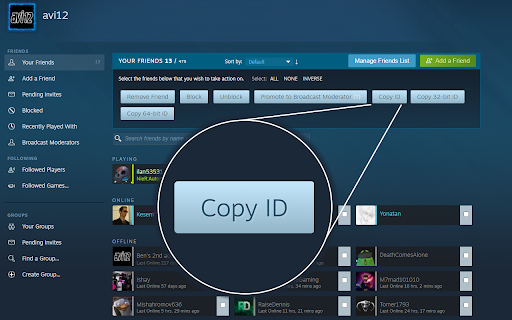

Скачать файл CRX расширения Steam ID Finder
Скачайте файлы расширений Steam ID Finder в формате crx, установите расширения Chrome вручную в браузере или поделитесь файлами crx с друзьями, чтобы легко установить расширения Chrome.
Инструкции по использованию расширения
                        Features:
1. Visit a Steam profile to see & copy the user's IDs
2. Right-click a profile URL to copy an associated ID
3. Visit the Friends Manager to copy multiple user IDs at once
4. Generate a line for SourceMod admin configuration when copying an ID

Source code: https://github.com/avi12/steam-id-finder
Основная информация о расширении
| Название |  Steam ID Finder Steam ID Finder |
| ID | iaeodlelphecgkpneeifmgcjgeoobjah |
| Официальный URL | https://chromewebstore.google.com/detail/steam-id-finder/iaeodlelphecgkpneeifmgcjgeoobjah |
| Описание | Display Steam users' IDs. One-click to copy. |
| Размер файла | 83.48 KB |
| Количество установок | 1,458 |
| Текущая Версия | 1.0.1 |
| Последнее Обновление | 2022-12-14 |
| Дата публикации | 2020-07-04 |
| Рейтинг | 4.67/5 Всего 6 оценок |
| Разработчик | https://avi12.com |
| Электронная почта | [email protected] |
| Тип оплаты | free |
| Официальный сайт расширения | https://avi12.com/steam-id-finder |
| URL страницы помощи | https://github.com/avi12/steam-id-finder/issues/new/choose |
| Поддерживаемые языки | en |
| manifest.json | |
{
    "update_url": "https:\/\/clients2.google.com\/service\/update2\/crx",
    "name": "Steam ID Finder",
    "short_name": "Steam ID",
    "description": "Display Steam users' IDs. One-click to copy.",
    "version": "1.0.1",
    "manifest_version": 3,
    "author": "avi12",
    "developer": {
        "name": "avi12",
        "url": "https:\/\/avi12.com\/skillshare-player-control"
    },
    "icons": {
        "16": "images\/icon-16.png",
        "19": "images\/icon-19.png",
        "24": "images\/icon-24.png",
        "32": "images\/icon-32.png",
        "38": "images\/icon-38.png",
        "48": "images\/icon-48.png",
        "64": "images\/icon-64.png",
        "96": "images\/icon-96.png",
        "128": "images\/icon-128.png"
    },
    "action": {
        "default_title": "Steam ID Finder Settings",
        "default_popup": "popup.html",
        "default_icon": {
            "16": "images\/icon-16.png",
            "19": "images\/icon-19.png",
            "24": "images\/icon-24.png",
            "32": "images\/icon-32.png",
            "38": "images\/icon-38.png",
            "48": "images\/icon-48.png",
            "64": "images\/icon-64.png",
            "96": "images\/icon-96.png",
            "128": "images\/icon-128.png"
        }
    },
    "content_scripts": [
        {
            "matches": [
                "https:\/\/steamcommunity.com\/id\/*",
                "https:\/\/steamcommunity.com\/profiles\/*"
            ],
            "js": [
                "build\/scripts\/steam-id-finder-content-script-initialize.js"
            ],
            "css": [
                "build\/styles-injected\/main.css"
            ]
        }
    ],
    "background": {
        "service_worker": "background.js"
    },
    "permissions": [
        "contextMenus",
        "storage"
    ],
    "host_permissions": [
        "https:\/\/api.steampowered.com\/ISteamUser\/*"
    ],
    "browser_specific_settings": {
        "gecko": {
            "id": "[email protected]"
        }
    }
} | |