MultiLogin
Using websites with multiple accounts at the same time is made easy. Create an independent tab with a click of a button.
Что такое MultiLogin?
MultiLogin - это расширение Chrome, разработанное https://multilogin.top, и его основная функция - "Using websites with multiple accounts at the same time is made easy. Create an independent tab with a click of a button.".
Снимки экрана расширения
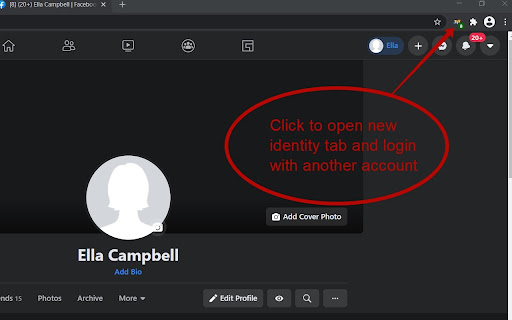

Скачать файл CRX расширения MultiLogin
Скачайте файлы расширений MultiLogin в формате crx, установите расширения Chrome вручную в браузере или поделитесь файлами crx с друзьями, чтобы легко установить расширения Chrome.
Инструкции по использованию расширения
                        This plugin makes it very easy to use multiple accounts on the same site at the same time. Simply click on the plugin icon and go to the site in the created tab of the browser. Reliably works in facebook, tweeter, instagram and other social networks. The plugin is safe to use, your data is not sent anywhere. After the browser is closed, the data is deleted.

P.S. Plugin does not work correctly in google services

1.0.10 - fixed bug in 72 Chrome version
1.0.14 - fixed bug in 80 Chrome version
1.0.17 - fixed bug in 87 Chrome version
1.0.19 - fixed error in gmail
1.0.25 - change tab image check url
Основная информация о расширении
| Название |  MultiLogin MultiLogin |
| ID | ijfgglilaeakmoilplpcjcgjaoleopfi |
| Официальный URL | https://chromewebstore.google.com/detail/multilogin/ijfgglilaeakmoilplpcjcgjaoleopfi |
| Описание | Using websites with multiple accounts at the same time is made easy. Create an independent tab with a click of a button. |
| Размер файла | 23.4 KB |
| Количество установок | 103,698 |
| Текущая Версия | 1.0.26 |
| Последнее Обновление | 2022-03-30 |
| Дата публикации | 2020-04-23 |
| Рейтинг | 4.65/5 Всего 926 оценок |
| Разработчик | https://multilogin.top |
| Электронная почта | [email protected] |
| Тип оплаты | free |
| Официальный сайт расширения | https://multilogin.top |
| URL страницы помощи | https://multilogin.top/support/ |
| URL страницы политики конфиденциальности | https://multilogin.top/privacy-policy.php |
| Поддерживаемые языки | de,en,fr,es,ru,ja |
| manifest.json | |
{
    "background": {
        "page": "background.html"
    },
    "browser_action": {
        "default_icon": "icon_128.png",
        "default_title": "New unique Tab"
    },
    "content_scripts": [
        {
            "all_frames": true,
            "js": [
                "content.min.js"
            ],
            "matches": [
                "http:\/\/*\/*",
                "https:\/\/*\/*"
            ],
            "run_at": "document_start"
        }
    ],
    "content_security_policy": "script-src 'self' https:\/\/www.google-analytics.com; object-src 'self'",
    "description": "__MSG_appDesc__",
    "icons": {
        "128": "icon_128.png"
    },
    "manifest_version": 2,
    "name": "MultiLogin",
    "permissions": [
        "contextMenus",
        "cookies",
        "storage",
        "tabs",
        "http:\/\/*\/*",
        "https:\/\/*\/*",
        "webRequest",
        "webRequestBlocking",
        "webNavigation"
    ],
    "update_url": "https:\/\/clients2.google.com\/service\/update2\/crx",
    "default_locale": "en",
    "version": "1.0.26"
} | |