HTML Style Quick Viewer
HTML DOM element style quick viewer
Что такое HTML Style Quick Viewer?
HTML Style Quick Viewer - это расширение Chrome, разработанное _(:з」∠)_, и его основная функция - "HTML DOM element style quick viewer".
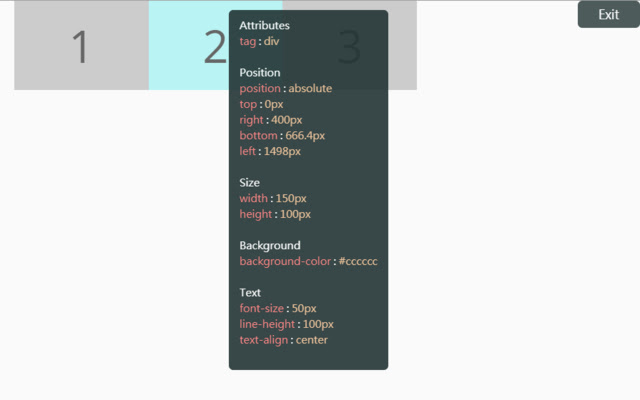
Снимки экрана расширения
Скачать файл CRX расширения HTML Style Quick Viewer
Скачайте файлы расширений HTML Style Quick Viewer в формате crx, установите расширения Chrome вручную в браузере или поделитесь файлами crx с друзьями, чтобы легко установить расширения Chrome.
Инструкции по использованию расширения
                        How about viewing the HTML DOM styles in a different way?
Just move your mouse and it shows the target's styles.

After installation, you may have to reload tabs to for the extension to take effect.

Instructions:
1. Click HTML Style Quick Viewer in the toolbar, then click 'run' button to start.
2. Move mouse to see the element's styles.
3. Mouse left click to close the popup panel.
4. Mouse middle click to pin the popup panel.
5. Click the 'Exit' button at the top-right or click 'Stop' button through the toolbar to stop.
Основная информация о расширении
| Название |  HTML Style Quick Viewer HTML Style Quick Viewer |
| ID | inafmkpmbkldliccdbeieeafnbkcmmap |
| Официальный URL | https://chrome.google.com/webstore/detail/html-style-quick-viewer/inafmkpmbkldliccdbeieeafnbkcmmap |
| Описание | HTML DOM element style quick viewer |
| Размер файла | 15.88 KB |
| Количество установок | 271 |
| Текущая Версия | 1.0.2 |
| Последнее Обновление | 2018-08-26 |
| Дата публикации | 2018-08-26 |
| Рейтинг | 5.00/5 Всего 3 оценок |
| Разработчик | _(:з」∠)_ |
| Электронная почта | [email protected] |
| Тип оплаты | free |
| Поддерживаемые языки | en |
| manifest.json | |
{
    "update_url": "https:\/\/clients2.google.com\/service\/update2\/crx",
    "name": "HTML Style Quick Viewer",
    "description": "HTML DOM element style quick viewer",
    "version": "1.0.2",
    "permissions": [
        "activeTab"
    ],
    "content_scripts": [
        {
            "matches": [
                "http:\/\/*\/*",
                "https:\/\/*\/*"
            ],
            "js": [
                "content\/content.js"
            ],
            "css": [
                "content\/content.css"
            ],
            "run_at": "document_start"
        }
    ],
    "browser_action": {
        "default_title": "HTML Style Quick Viewer\nRight click (Close)\nMiddle click (Pin)",
        "default_icon": {
            "16": "icons\/icon_16.png",
            "32": "icons\/icon_32.png",
            "48": "icons\/icon_48.png",
            "128": "icons\/icon_128.png"
        },
        "default_popup": "popup\/popup.html"
    },
    "manifest_version": 2
} | |