UCLA Automated Login
Tired of entering your UCLA logon ID and username every single time? Install the UCLA Automated Login! By clicking the icon after…
Что такое UCLA Automated Login?
UCLA Automated Login - это расширение Chrome, разработанное Stanley Hsu, и его основная функция - "Tired of entering your UCLA logon ID and username every single time? Install the UCLA Automated Login! By clicking the icon after…".
Снимки экрана расширения
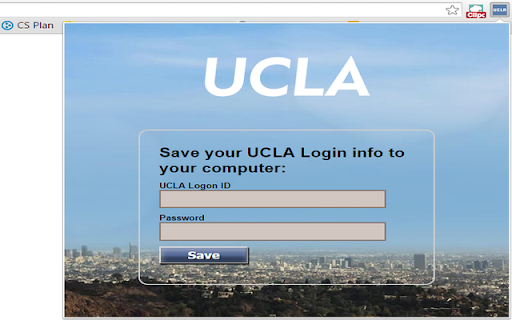
Скачать файл CRX расширения UCLA Automated Login
Скачайте файлы расширений UCLA Automated Login в формате crx, установите расширения Chrome вручную в браузере или поделитесь файлами crx с друзьями, чтобы легко установить расширения Chrome.
Инструкции по использованию расширения
                        Tired of entering your UCLA logon ID and username every single time?
Install the UCLA Automated Login!

By clicking the icon after installing and entering the logon info, you will never have to manually enter them again.

This extension allows you to automatically log in to all the newly updated UCLA authentication pages.
Основная информация о расширении
| Название |  UCLA Automated Login UCLA Automated Login |
| ID | inelalkinoinjgbfjfmkfiagmfefpeic |
| Официальный URL | https://chromewebstore.google.com/detail/ucla-automated-login/inelalkinoinjgbfjfmkfiagmfefpeic |
| Описание | Tired of entering your UCLA logon ID and username every single time? Install the UCLA Automated Login! By clicking the icon after… |
| Размер файла | 150 KB |
| Количество установок | 13 |
| Текущая Версия | 2.0.1 |
| Последнее Обновление | 2015-11-10 |
| Дата публикации | 2015-11-10 |
| Рейтинг | 5.00/5 Всего 3 оценок |
| Разработчик | Stanley Hsu |
| Тип оплаты | free |
| Поддерживаемые языки | en |
| manifest.json | |
{
    "update_url": "http:\/\/clients2.google.com\/service\/update2\/crx",
    "name": "UCLA Automated Login",
    "version": "2.0.1",
    "manifest_version": 2,
    "icons": {
        "16": "images\/icon16.png",
        "48": "images\/icon48.png",
        "128": "images\/ucla128.png"
    },
    "background": {
        "page": "background.html"
    },
    "permissions": [
        "tabs",
        "https:\/\/*\/*"
    ],
    "options_page": "optionPage.html",
    "browser_action": {
        "default_icon": "images\/icon16.png",
        "default_title": "UCLA Automated Login",
        "default_popup": "options.html"
    }
} | |