Playlist Exporter
Export Playlists.
Что такое Playlist Exporter?
Playlist Exporter - это расширение Chrome, разработанное http://dblk.org, и его основная функция - "Export Playlists.".
Снимки экрана расширения

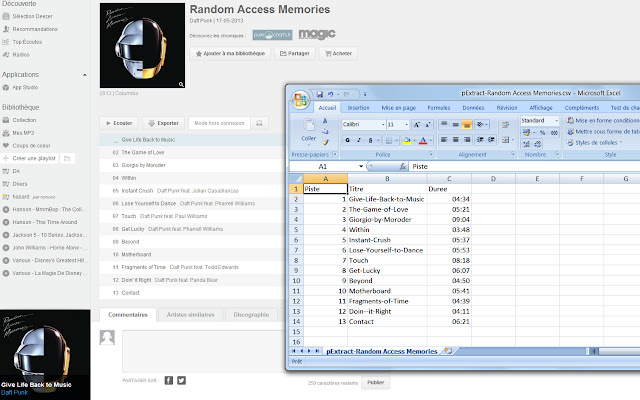
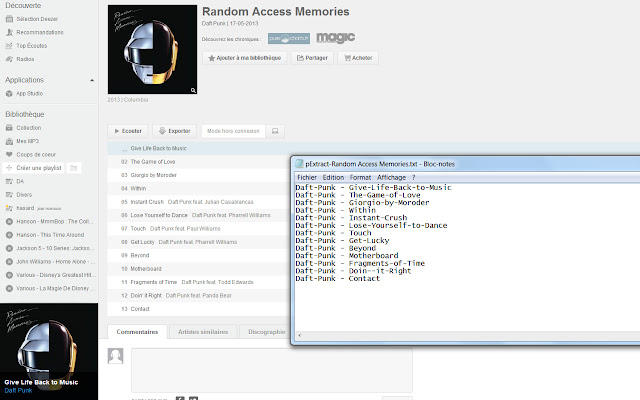
Скачать файл CRX расширения Playlist Exporter
Скачайте файлы расширений Playlist Exporter в формате crx, установите расширения Chrome вручную в браузере или поделитесь файлами crx с друзьями, чтобы легко установить расширения Chrome.
Инструкции по использованию расширения
                        Export playlists in CSV or Groovylists file.
Currently you can only export playlist from Deezer.com.

Visit Deezer, and go to any album or playlist, you'll see a button "Export" close to "Listen" (see screenshots).

Simply click on it, and you'll retrieve your playlist.

Open with your favorite spreadsheet software or copy/paste to groovylists to import.
Основная информация о расширении
| Название |  Playlist Exporter Playlist Exporter |
| ID | ipdibomfjmifchhealolhhmocbfnjemj |
| Официальный URL | https://chrome.google.com/webstore/detail/playlist-exporter/ipdibomfjmifchhealolhhmocbfnjemj |
| Описание | Export Playlists. |
| Размер файла | 26.15 KB |
| Количество установок | 1,382 |
| Текущая Версия | 0.2.9 |
| Последнее Обновление | 2016-04-19 |
| Дата публикации | 2016-04-19 |
| Рейтинг | 2.31/5 Всего 42 оценок |
| Разработчик | http://dblk.org |
| Тип оплаты | free |
| Официальный сайт расширения | http://dblk.org/pexporter |
| Поддерживаемые языки | en,fr,es |
| manifest.json | |
{
    "update_url": "https:\/\/clients2.google.com\/service\/update2\/crx",
    "name": "__MSG_name__",
    "version": "0.2.9",
    "manifest_version": 2,
    "description": "__MSG_desc__",
    "default_locale": "en",
    "icons": {
        "48": "icon48.png",
        "128": "icon128.png"
    },
    "content_scripts": [
        {
            "matches": [
                "*:\/\/*.deezer.com\/*"
            ],
            "css": [
                "pExport.css"
            ],
            "js": [
                "pExport.js"
            ],
            "run_at": "document_end"
        }
    ],
    "permissions": [
        "*:\/\/*.deezer.com\/*"
    ],
    "background": {
        "scripts": [
            "background.js"
        ]
    },
    "options_page": "options.html",
    "web_accessible_resources": [
        "pExport-0.2.9.js",
        "img\/pExport.png"
    ]
} | |