Wiki It
Easily Wikipedia anything on the web without having to leave the page
Что такое Wiki It?
Wiki It - это расширение Chrome, разработанное dlask, и его основная функция - "Easily Wikipedia anything on the web without having to leave the page".
Снимки экрана расширения
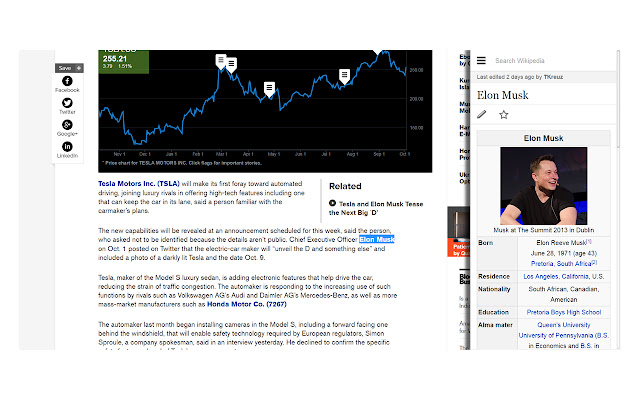
Скачать файл CRX расширения Wiki It
Скачайте файлы расширений Wiki It в формате crx, установите расширения Chrome вручную в браузере или поделитесь файлами crx с друзьями, чтобы легко установить расширения Chrome.
Инструкции по использованию расширения
                        Wiki It allows you to easily Wikipedia anything on a website without having to leave the page or open a new tab.

+Highlight your desired word(s) (you can do this easily by double clicking)

+Then use the shortcut CTRL + SHIFT + S or click the icon in the top right.(You can change the keyboard shortcut to whatever you want in the extension manager)

+Watch your info slide in! It is that easy!
Основная информация о расширении
| Название |  Wiki It Wiki It |
| ID | jcmckdmbneffdllfpndkgidingockofb |
| Официальный URL | https://chrome.google.com/webstore/detail/wiki-it/jcmckdmbneffdllfpndkgidingockofb |
| Описание | Easily Wikipedia anything on the web without having to leave the page |
| Размер файла | 44.26 KB |
| Количество установок | 447 |
| Текущая Версия | 2.0 |
| Последнее Обновление | 2014-10-05 |
| Дата публикации | 2014-10-05 |
| Рейтинг | 4.60/5 Всего 25 оценок |
| Разработчик | dlask |
| Тип оплаты | free |
| Поддерживаемые языки | en-US |
| manifest.json | |
{
    "update_url": "https:\/\/clients2.google.com\/service\/update2\/crx",
    "name": "Wiki It",
    "description": "Easily Wikipedia anything on the web without having to leave the page",
    "version": "2.0",
    "permissions": [
        "activeTab"
    ],
    "background": {
        "scripts": [
            "background.js"
        ],
        "persistent": false
    },
    "browser_action": {
        "default_title": "Wiki It",
        "default_icon": "icon.png"
    },
    "manifest_version": 2,
    "icons": {
        "16": "icon.png",
        "48": "icon.png",
        "128": "icon.png"
    },
    "commands": {
        "_execute_browser_action": {
            "suggested_key": {
                "windows": "Ctrl+Shift+S",
                "mac": "Command+Shift+S",
                "chromeos": "Ctrl+Shift+S",
                "linux": "Ctrl+Shift+S"
            }
        }
    }
} | |