Alyce for Chrome
Chrome Extension for Alyce
Что такое Alyce for Chrome?
Alyce for Chrome - это расширение Chrome, разработанное Alyce, и его основная функция - "Chrome Extension for Alyce".
Снимки экрана расширения



Скачать файл CRX расширения Alyce for Chrome
Скачайте файлы расширений Alyce for Chrome в формате crx, установите расширения Chrome вручную в браузере или поделитесь файлами crx с друзьями, чтобы легко установить расширения Chrome.
Инструкции по использованию расширения
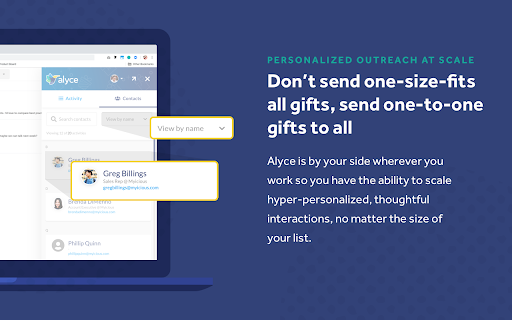
                        Alyce for Chrome allows you to take a more effective personal approach wherever you spend time selling: Linkedin, Salesforce, Gmail, and Outlook.

Alyce stays by your side in your key sales tools, so you can take a more effective human selling approach.

No more switching between tabs or opening a thousand apps open at once— Alyce goes with your reps wherever they’re selling to make personalized gifting the most effective part of their selling routine.
Основная информация о расширении
| Название |  Alyce for Chrome Alyce for Chrome |
| ID | jihallkndhjkkadalkipbhodlcencbpl |
| Официальный URL | https://chromewebstore.google.com/detail/alyce-for-chrome/jihallkndhjkkadalkipbhodlcencbpl |
| Описание | Chrome Extension for Alyce |
| Размер файла | 3.53 MB |
| Количество установок | 238 |
| Текущая Версия | 0.111.2 |
| Последнее Обновление | 2022-09-29 |
| Дата публикации | 2020-06-24 |
| Рейтинг | 5.00/5 Всего 1 оценок |
| Разработчик | Alyce |
| Электронная почта | [email protected] |
| Тип оплаты | free |
| Официальный сайт расширения | http://www.alyce.com |
| URL страницы помощи | https://alycesupport.zendesk.com/hc/en-us/sections/360004879971-Chrome-Extension |
| URL страницы политики конфиденциальности | https://www.alyce.com/privacy-policy |
| Поддерживаемые языки | en |
| manifest.json | |
{
    "update_url": "https:\/\/clients2.google.com\/service\/update2\/crx",
    "short_name": "Alyce",
    "name": "Alyce for Chrome",
    "description": "Chrome Extension for Alyce",
    "version": "0.111.2",
    "manifest_version": 2,
    "background": {
        "scripts": [
            "\/static\/js\/background.js"
        ],
        "persistent": false
    },
    "icons": {
        "16": "icons\/icon-16.png",
        "48": "icons\/icon-48.png",
        "128": "icons\/icon-128.png"
    },
    "browser_action": [],
    "content_scripts": [
        {
            "matches": [
                "http:\/\/mail.google.com\/*",
                "https:\/\/mail.google.com\/*"
            ],
            "css": [
                "\/static\/css\/common.css"
            ],
            "js": [
                "\/static\/js\/gmailInject.js"
            ]
        },
        {
            "matches": [
                "https:\/\/outlook.office.com\/owa\/*",
                "https:\/\/outlook.office365.com\/owa\/*"
            ],
            "css": [
                "\/static\/css\/common.css"
            ],
            "js": [
                "\/static\/js\/outlookInject.js"
            ]
        },
        {
            "matches": [
                "https:\/\/outlook.office.com\/mail\/*",
                "https:\/\/outlook.office365.com\/mail\/*"
            ],
            "css": [
                "\/static\/css\/common.css"
            ],
            "js": [
                "\/static\/js\/outlookNewInject.js"
            ]
        },
        {
            "matches": [
                "https:\/\/www.linkedin.com\/*"
            ],
            "css": [
                "\/static\/css\/common.css"
            ],
            "js": [
                "\/static\/js\/linkedInInject.js"
            ]
        },
        {
            "matches": [
                "https:\/\/*.lightning.force.com\/*"
            ],
            "css": [
                "\/static\/css\/common.css"
            ],
            "js": [
                "\/static\/js\/salesForceInject.js"
            ]
        }
    ],
    "web_accessible_resources": [
        "\/static\/css\/common.css",
        "images\/email-badge.svg",
        "images\/outline-bird.svg",
        "images\/social\/linkedin.svg",
        "images\/social\/youtube.svg",
        "images\/social\/facebook.svg",
        "images\/social\/instagram.svg",
        "images\/social\/comments.svg",
        "images\/social\/pinterest.svg",
        "images\/social\/twitter.svg",
        "images\/social\/info-regular.svg",
        "images\/open.svg",
        "images\/opener.svg",
        "images\/loading.svg",
        "images\/header-popup-mask.svg",
        "proxy\/*",
        "fonts\/*"
    ],
    "content_security_policy": "script-src 'self'; object-src 'self'; frame-src 'self' https:\/\/app.alyce.com https:\/\/extension.alyce.com https:\/\/localhost:9999 https:\/\/login.alyce.com\/;",
    "permissions": [
        "activeTab",
        "contextMenus",
        "cookies",
        "https:\/\/*.alycedev.com\/",
        "https:\/\/*.alyce.com\/",
        "https:\/\/app.alyce.com\/*",
        "https:\/\/*.amazonaws.com\/*.alyce.co\/*",
        "https:\/\/mail.google.com\/*",
        "https:\/\/www.linkedin.com\/*",
        "https:\/\/outlook.office.com\/owa\/*",
        "https:\/\/outlook.office.com\/mail\/*",
        "https:\/\/outlook.office365.com\/owa\/*",
        "https:\/\/outlook.office365.com\/mail\/*"
    ]
} | |