Livestream Helper Lite for Facebook™
Free your hands by automatically pushes viewers to follow your page.
Что такое Livestream Helper Lite for Facebook™?
Livestream Helper Lite for Facebook™ - это расширение Chrome, разработанное https://fblivestream.tech, и его основная функция - "Free your hands by automatically pushes viewers to follow your page.".
Снимки экрана расширения
Скачать файл CRX расширения Livestream Helper Lite for Facebook™
Скачайте файлы расширений Livestream Helper Lite for Facebook™ в формате crx, установите расширения Chrome вручную в браузере или поделитесь файлами crx с друзьями, чтобы легко установить расширения Chrome.
Инструкции по использованию расширения
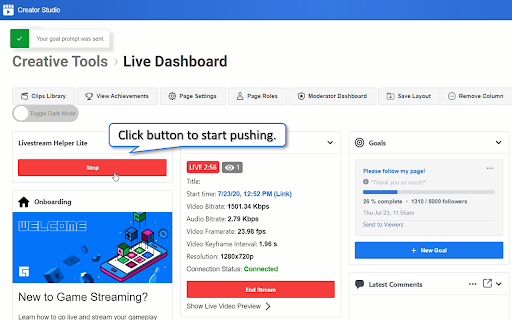
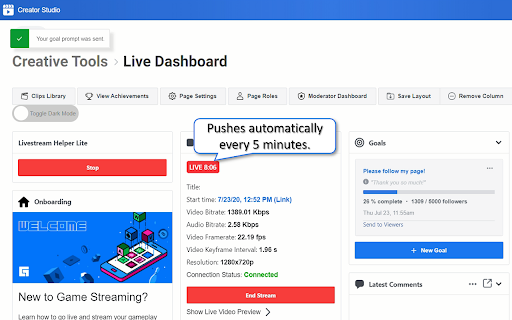
                        Do you know that you can push viewers to follow your page or share your livestream every 5 minutes while you are streaming? However, this requires you to use your mouse frequently and we know it is not an easy task to do, especially if you are livestreaming your gameplay or any other activity that kept your hands busy.

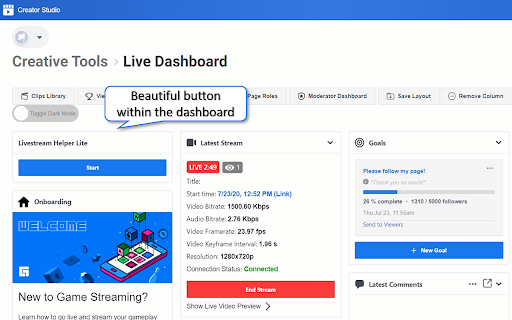
Therefore, we created Livestream Helper, a lightweight extension to help you do just that! Livestream Helper creates a beautiful yet simple button within your Facebook™ live dashboard that allows you to ask your viewers to follow your page automatically every 5 minutes for about half an hour. After that, a webpage refresh is required to clear that limit and the button can be pressed again.

If you like what Livestream Helper Lite for Facebook™ does for you, you can check out the PLUS and PRO version of Livestream Helper plugin! The Livestream Helper Plus allows you to switch between pushing viewers to follow or share your page manually for as long as you stream!

The Livestream Helper Pro provides a 'Smart' option to intelligently switch between the two modes such that the extension pushes the viewers to follow your page when the number of viewers is high and pushes the viewers to share the livestream when it detects a drop in number of viewers. This can occurs periodically especially if your are a game creator between the period of finishing one game and match making process.

**Plus and Pro version can be found in our webpage here: http://fblivestream.tech/

Livestream Helper currently supports Facebook runing English, simplified Chinese and traditional Chinese only, more language will be supported in the near future. If you have any inquiries, please do not hesitate to shoot us an email @ [email protected], we will try our best to support you.

Copyright note: Facebook™ is a registered trademark of Facebook Inc. This extension is neither endorsed by or affiliated with Facebook.
Основная информация о расширении
| Название |  Livestream Helper Lite for Facebook™ Livestream Helper Lite for Facebook™ |
| ID | jojffcahnicdpknokcelmlciihjkmjaj |
| Официальный URL | https://chromewebstore.google.com/detail/livestream-helper-lite-fo/jojffcahnicdpknokcelmlciihjkmjaj |
| Описание | Free your hands by automatically pushes viewers to follow your page. |
| Размер файла | 20.99 KB |
| Количество установок | 97 |
| Текущая Версия | 1.0.4 |
| Последнее Обновление | 2020-08-24 |
| Дата публикации | 2020-07-28 |
| Рейтинг | 5.00/5 Всего 1 оценок |
| Разработчик | https://fblivestream.tech |
| Электронная почта | [email protected] |
| Тип оплаты | free |
| Официальный сайт расширения | https://fblivestream.tech/ |
| URL страницы помощи | https://fblivestream.tech/faq |
| Поддерживаемые языки | en,en-GB,en-US,zh-CN,zh-TW |
| manifest.json | |
{
    "update_url": "https:\/\/clients2.google.com\/service\/update2\/crx",
    "default_locale": "en",
    "name": "__MSG_extname__",
    "version": "1.0.4",
    "description": "__MSG_extdesc__",
    "icons": {
        "128": "img\/icon_128.png",
        "64": "img\/icon_64.png",
        "32": "img\/icon_32.png"
    },
    "permissions": [
        "*:\/\/business.facebook.com\/creatorstudio\/?tab=streaming_live_dashboard*"
    ],
    "content_scripts": [
        {
            "matches": [
                "*:\/\/business.facebook.com\/creatorstudio\/?tab=streaming_live_dashboard*"
            ],
            "js": [
                "contentscript.js"
            ]
        }
    ],
    "browser_action": {
        "default_icon": "img\/icon_32.png"
    },
    "manifest_version": 2
} | |