Translating with Papago
An extension that utilizes Naver's Papago translation engine.
Что такое Translating with Papago?
Translating with Papago - это расширение Chrome, разработанное perrylohmann, и его основная функция - "An extension that utilizes Naver's Papago translation engine.".
Снимки экрана расширения


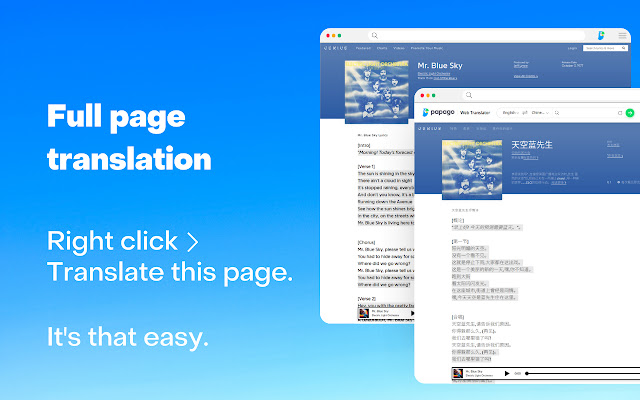
Скачать файл CRX расширения Translating with Papago
Скачайте файлы расширений Translating with Papago в формате crx, установите расширения Chrome вручную в браузере или поделитесь файлами crx с друзьями, чтобы легко установить расширения Chrome.
Инструкции по использованию расширения
                        This extension uses Naver's Papago translation service to translate text through the toolbar popup or directly on web pages.

When highlighting text on web pages, clicking the icon that appears will instantly show you it's translation. If you don't like this functionality, there are settings for restricting when this icon displays while you are web browsing.

Alternatively, you can use the toolbar popup to quickly translate text. 13 languages are supported through Papago's AI translation service, along with automatic language detection.

Translating entire web pages is also possible, just by clicking "Translate this page" within the context menu.
Основная информация о расширении
| Название |  Translating with Papago Translating with Papago |
| ID | kjlcghnjglnjdagnpdhphkbljflodhda |
| Официальный URL | https://chrome.google.com/webstore/detail/translating-with-papago/kjlcghnjglnjdagnpdhphkbljflodhda |
| Описание | An extension that utilizes Naver's Papago translation engine. |
| Размер файла | 90.13 KB |
| Количество установок | 10,310 |
| Текущая Версия | 1.0.0 |
| Последнее Обновление | 2022-11-03 |
| Дата публикации | 2022-11-03 |
| Рейтинг | 2.63/5 Всего 16 оценок |
| Разработчик | perrylohmann |
| Электронная почта | [email protected] |
| Тип оплаты | free |
| Поддерживаемые языки | en,es,ko |
| manifest.json | |
{
"update_url": "https:\/\/clients2.google.com\/service\/update2\/crx",
"author": "Joe Lohmann",
"background": {
"service_worker": "background\/background.js",
"type": "module"
},
"action": {
"default_icon": {
"512": "icons\/512.png",
"128": "icons\/128.png",
"64": "icons\/64.png",
"48": "icons\/48.png",
"38": "icons\/38.png",
"32": "icons\/32.png",
"19": "icons\/19.png",
"16": "icons\/16.png"
},
"default_title": "Papago Translator",
"default_popup": "popup\/popup.html"
},
"content_scripts": [
{
"all_frames": true,
"matches": [
" | |