Google Classroom Peer Review
Automatic assignment of peer's assignment to students.
Что такое Google Classroom Peer Review?
Google Classroom Peer Review - это расширение Chrome, разработанное sherry.shanli.yuan, и его основная функция - "Automatic assignment of peer's assignment to students.".
Снимки экрана расширения
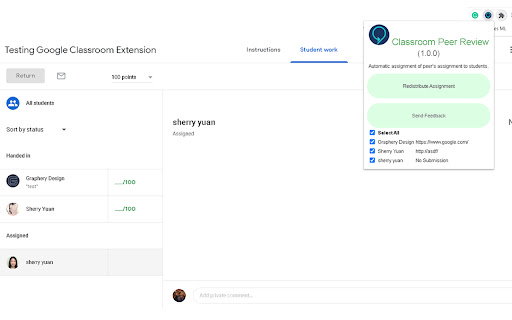
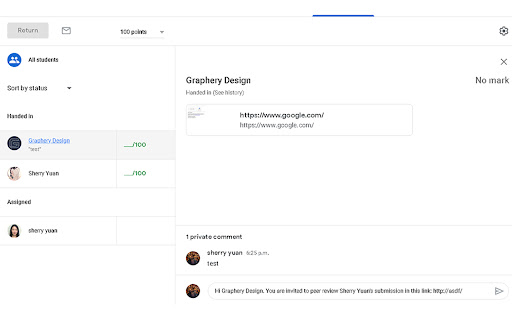
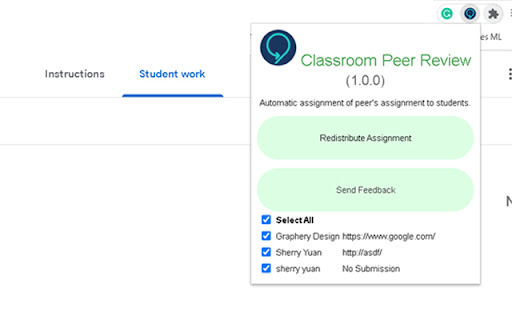
Скачать файл CRX расширения Google Classroom Peer Review
Скачайте файлы расширений Google Classroom Peer Review в формате crx, установите расширения Chrome вручную в браузере или поделитесь файлами crx с друзьями, чтобы легко установить расширения Chrome.
Инструкции по использованию расширения
                        Allows peer review in google classroom. It is a one click redistribution extension, where selected student's work will be redistributed.

This extension works well with the additional feature for Hypatia Desktop built, can be found in this repo (https://github.com/blckwolf5851/hypatia-peer-eval)

Step 1: Go to the all submission page of an assignment (by clicking "All Student" tab on the left)

Note: Always click on "All Student" tab then refresh the page each time before clicking on extension button to avoid any unexpected behaviors.

Step 2: Click the extension button, and it will by default select all students to distribute. You could deselect students so their work will not be distributed and they will not be receiving peer's submission.

Step 3: Once everything is configured correctly, press "Redistribute Assignment" button to distribute submission among students.

You will see the invitation to peer review appear in the private comment box for each student, this gives you a chance to make final changes to the invitation before sending them to students. Go on and send these once you are comfortable with the arrangements.

If you have feedbacks: email to [email protected]

Version Log:
1.0.1: Fix no submission issue, add additional usage documentations
1.0.2: Allow redistribution of large class size

FAQs:
1. It does not gather all submissions or the redistribution button does nothing
    Try disabling other extensions to see if it works
2. Sometimes it confuses the names i.e it says "Hi a..." when it should say "Hi b..."
    Remember to follow all steps above each time before you hit "Redistribute Assignment" button. The refresh step is especially important.
Основная информация о расширении
| Название |  Google Classroom Peer Review Google Classroom Peer Review |
| ID | kpdjoooficdkhfkpmnblbiecdnecefae |
| Официальный URL | https://chromewebstore.google.com/detail/google-classroom-peer-rev/kpdjoooficdkhfkpmnblbiecdnecefae |
| Описание | Automatic assignment of peer's assignment to students. |
| Размер файла | 448 KB |
| Количество установок | 856 |
| Текущая Версия | 1.0.2 |
| Последнее Обновление | 2021-07-04 |
| Дата публикации | 2021-01-02 |
| Рейтинг | 2.50/5 Всего 2 оценок |
| Разработчик | sherry.shanli.yuan |
| Электронная почта | [email protected] |
| Тип оплаты | free |
| Поддерживаемые языки | en |
| manifest.json | |
{
"update_url": "https:\/\/clients2.google.com\/service\/update2\/crx",
"browser_action": {
"default_icon": "icon.png",
"default_popup": "popup.html"
},
"description": "Automatic assignment of peer's assignment to students.",
"icons": {
"128": "icon_128.png"
},
"content_scripts": [
{
"matches": [
"https:\/\/classroom.google.com\/*"
],
"js": [
"content.js"
]
}
],
"manifest_version": 2,
"name": "Google Classroom Peer Review",
"permissions": [
" | |