Journal access through HKU library
A simple chrome extension that let you access journal through HKU library resources (HKU ID needed).
Что такое Journal access through HKU library?
Journal access through HKU library - это расширение Chrome, разработанное junyichen, и его основная функция - "A simple chrome extension that let you access journal through HKU library resources (HKU ID needed).".
Снимки экрана расширения

Скачать файл CRX расширения Journal access through HKU library
Скачайте файлы расширений Journal access through HKU library в формате crx, установите расширения Chrome вручную в браузере или поделитесь файлами crx с друзьями, чтобы легко установить расширения Chrome.
Инструкции по использованию расширения
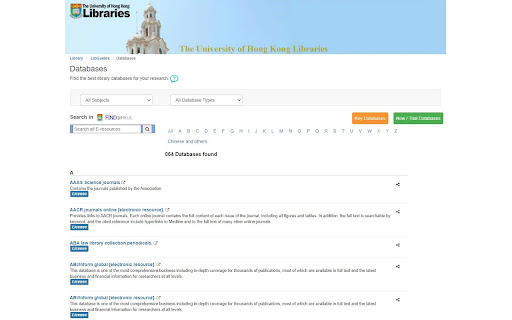
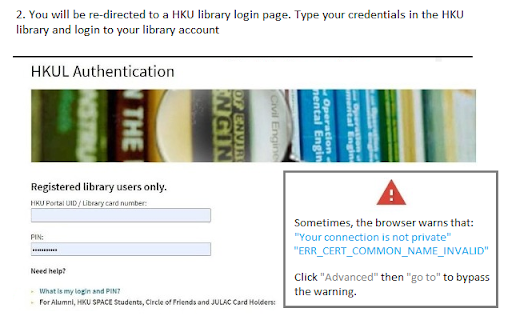
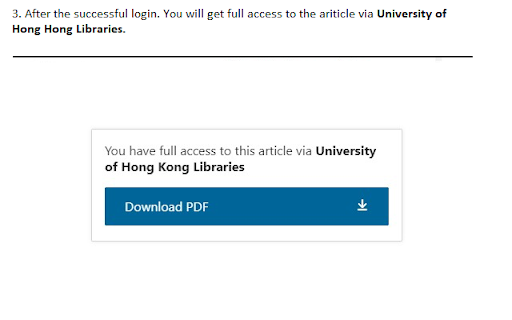
An extension that redirect you from the journal page to the HKU library portal. You need to login the HKU library. The extension will automatically parse the current URL of the current paper page to the HKU library address. Основная информация о расширении
| Название |  Journal access through HKU library Journal access through HKU library |
| ID | lcnnijjgcjfpcfjgnahbcpapbmkiceld |
| Официальный URL | https://chromewebstore.google.com/detail/journal-access-through-hk/lcnnijjgcjfpcfjgnahbcpapbmkiceld |
| Описание | A simple chrome extension that let you access journal through HKU library resources (HKU ID needed). |
| Размер файла | 47.64 KB |
| Количество установок | 135 |
| Текущая Версия | 0.0.1 |
| Последнее Обновление | 2021-09-02 |
| Дата публикации | 2021-08-04 |
| Разработчик | junyichen |
| Электронная почта | [email protected] |
| Тип оплаты | free |
| Поддерживаемые языки | en-US |
| manifest.json | |
{
    "update_url": "https:\/\/clients2.google.com\/service\/update2\/crx",
    "manifest_version": 2,
    "name": "Journal access through HKU library",
    "short_name": "HKULibJ",
    "description": "A simple chrome extension that let you access journal through HKU library resources (HKU ID needed).",
    "version": "0.0.1",
    "minimum_chrome_version": "38",
    "permissions": [
        "contextMenus",
        "tabs"
    ],
    "icons": {
        "16": "assets\/icon16.png",
        "128": "assets\/icon128.png"
    },
    "background": {
        "page": "background.html"
    }
} | |