Tab Knight
This extension gives you shortcut to so many browser options
Что такое Tab Knight?
Tab Knight - это расширение Chrome, разработанное Pavan Ebbadi, и его основная функция - "This extension gives you shortcut to so many browser options".
Снимки экрана расширения
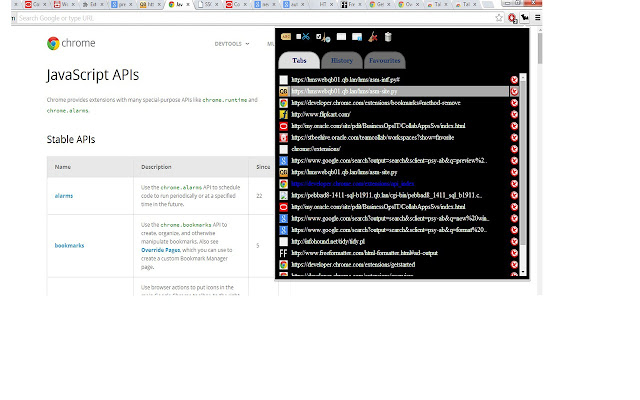
Скачать файл CRX расширения Tab Knight
Скачайте файлы расширений Tab Knight в формате crx, установите расширения Chrome вручную в браузере или поделитесь файлами crx с друзьями, чтобы легко установить расширения Chrome.
Инструкции по использованию расширения
                        This is an extension where you can find quick links to all your opened Tabs, history, bookmarks. U can also perform operations on them like navigating between the tabs, closing a tab, opening a history/bookmark on a new tab , deleting an history/bookmark. Also you can find settings bar on top of the pop to clear complete history,cache ,open incognito window etc.

I initially developed this for myself to navigate between tabs as i open too many of them later added few more features and uploaded it here. So any suggestions ,feedback or if you find any bug please share it with me.


If you have any queries or issues mail it to [email protected]

Demo Link https://www.youtube.com/watch?v=tFmOSNc5QVE&feature=youtu.be
Hope you find this plugin useful.
Основная информация о расширении
| Название |  Tab Knight Tab Knight |
| ID | mabkhheaeaegggfmcdabmhfnppnmcbhk |
| Официальный URL | https://chrome.google.com/webstore/detail/tab-knight/mabkhheaeaegggfmcdabmhfnppnmcbhk |
| Описание | This extension gives you shortcut to so many browser options |
| Размер файла | 365 KB |
| Количество установок | 670 |
| Текущая Версия | 2.0.2 |
| Последнее Обновление | 2015-02-17 |
| Дата публикации | 2015-02-17 |
| Рейтинг | 4.80/5 Всего 25 оценок |
| Разработчик | Pavan Ebbadi |
| Тип оплаты | free |
| Поддерживаемые языки | en |
| manifest.json | |
{
    "update_url": "https:\/\/clients2.google.com\/service\/update2\/crx",
    "manifest_version": 2,
    "name": "Tab Knight",
    "description": "This extension gives you shortcut to so many browser options",
    "version": "2.0.2",
    "permissions": [
        "management",
        "tabs",
        "debugger",
        "history",
        "bookmarks",
        "browsingData",
        "sessions",
        "contextMenus",
        "chrome:\/\/favicon\/",
        "storage"
    ],
    "background": {
        "scripts": [
            "background.js"
        ],
        "persistent": true
    },
    "icons": {
        "16": "tab_knight_icon16x16.png"
    },
    "browser_action": {
        "default_icon": "tab_knight_icon.png",
        "default_popup": "popup.html"
    }
} | |